DELL RK9MN Poweredge Backplane Card MX740C 6X2.5FTFT
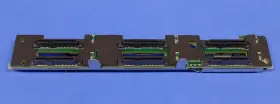
( Brand: Dell ), ( Compatible Brand: For Dell ), ( Type: Backplane ), ( Compatible Drive Size: 2.5 In ), ( Compatible Model: For Poweredge Mx740c ), ( Manufacturer Part Number: RK9MN )
Review DELL New Poweredge 6x2.5ftft Backplane Assembly Card
The Dell RK9MN PowerEdge MX740c 6x2.5in FTFT Backplane Card is a versatile and high-density expansion solution designed for Dell PowerEdge MX740c servers. This backplane card provides six slots for 2.5-inch hard drives or solid-state drives (SSDs), allowing for increased storage capacity and flexibility in your server environment.
The FTFT (Flexible Tray Type) design of this backplane card ensures compatibility with a wide range of Dell and third-party drive trays, making it a practical choice for various deployment scenarios. Each slot supports both SAS (Serial Attached SCSI) and SATA (Serial ATA) drives, enabling you to mix and match different drive types within the same server.
This backplane card features a robust design with a hot-plug capability, which allows for the replacement or installation of drives without powering down the server. It also supports RAID 0, 1, 5, 6, and 10 configurations, providing data protection and redundancy options to safeguard your critical information.
The Dell RK9MN PowerEdge MX740c 6x2.5in FTFT Backplane Card is engineered with superior craftsmanship and utilizes high-quality components to ensure reliable operation. It is compatible with PowerEdge MX740c servers and is an essential component for expanding the storage capacity and capabilities of your Dell PowerEdge infrastructure.
In summary, this Dell RK9MN PowerEdge MX740c 6x2.5in FTFT Backplane Card is a valuable addition to your PowerEdge server environment. It offers six slots for 2.5-inch drives, supports both SAS and SATA drives, features a hot-plug design, and is compatible with various RAID configurations. With its versatile design and robust build quality, this backplane card delivers the reliability and flexibility you need to manage your data storage effectively.
The Dell RK9MN PowerEdge MX740c 6x2.5ft FT Backplane Card is a server expansion card designed for use with Dell PowerEdge MX700 and MX900 servers. This card provides six 2.5-inch drive bays for additional storage capacity. Here are some potential pros and cons of purchasing this card:
Pros:1. Additional storage capacity: The primary advantage of this card is the ability to add six more 2.5-inch hard drives or solid-state drives to your server, increasing its storage capacity.
2. Compatibility: This card is specifically designed for use with Dell PowerEdge MX700 and MX900 servers, ensuring a seamless fit and reliable operation.
3. Flexibility: The card can support a range of drive types, including SAS, SATA, and SSD, enabling you to choose the best storage solution for your needs.
4. Hot-plug capability: The drives on the card can be swapped out or replaced without powering down the server, minimizing downtime and improving system availability.
Cons:1. Cost: The card itself and the additional drives required can represent a significant up-front investment.
2. Complexity: Installing the card and configuring it within your server environment may require some technical expertise.
3. Cooling requirements: The additional drives may generate additional heat, which could require additional cooling measures to be put in place.
Conclusion:The Dell RK9MN PowerEdge MX740c 6x2.5ft FT Backplane Card can be a valuable addition to your Dell PowerEdge MX700 or MX900 server, providing increased storage capacity and flexibility. However, it also comes with an up-front cost and potential complexity. Carefully consider your server's current and future storage needs, as well as your technical capabilities, before making a purchase decision.
Recommendation:If you find that the additional storage capacity offered by the Dell RK9MN PowerEdge MX740c 6x2.5ft FT Backplane Card aligns with your server's requirements and your organization's budget, then this card can be a worthwhile investment to enhance your server's capabilities. It's essential to ensure that you have the necessary technical expertise to install and configure the card, or seek assistance from a qualified IT professional.
Details:
part #: rk9mn prices
- $39.99-$67.49
specifications serversappy:
- brand: Dell
- compatible brand: For Dell
- type: Backplane
- compatible drive size: 2.5 In
- compatible model: For Poweredge Mx740c
- manufacturer part number: RK9MN
payments serversappy:
- wallet: Apple-pay
- other
- credit card: Diners-club
general serversappy:
- Enterprise Networking, Servers > Server Components > Other Ent Server Components
- condition: Open box
seller serversappy:
- # reviews: 12652
- rating: 99.7%
- city: Marlin, Texas
returns serversappy:
- policy: No Returns
shipping serversappy:
- type: Fixed
- cost: $0.00
- class: Standard
- service: Standard
- transit: 3-8 Days
offer serversappy:
- options: Ship-to-home
- quantity: 1
- started: August 25, 2025
- sold: 0
- availability: In Stock
- best offers: True
Dell RK9MN Is Similar To:
- Dell 0jnmfw Poweredge C4130 160x90mm Thermal Module Sxm2-gpu Cooling Heatsink Jnmfw B (42.7% similar) No others please. The photos and the actual item may have 5-10% difference. Select a topic. Exchange on certain items. Lock: ROOM202-G. Dell poweredge C4130 160X90MM thermal module SXM2-GPU cooling heat sink Jenifer a n technology solution...(July 21st, 2024)
- Dell 72hgp Poweredge R430 Mini Sas Sata Ssd Bp To Perc Cable Black 072hgp (40.6% similar) The listed prices do not apply. May have signs on wears...(July 21st, 2024)
- Dell 4pg76 Poweredge 2u Server Front Bezel P n 04pg76 Tested Grade B (36.1% similar) Any parts not photographed will not be included. Dell poweredge 2u server front bezel p/n: 4PG76 tested working please carefully review the photos and details of item before purchasing to avoid buying incorrect. Cosmetic issues are not covered...(July 21st, 2024)
- Dell 0800jh 800jh Slot 6 Pcie 3.0 X16 Riser 3 Card For Poweredge R730xd R730 (31.2% similar) That fact may be exhibited in possible wear and tear associated with normal everyday use. Shipping is free. This is a used item. It is ideal for those who are looking other enterprise server components. There are not too many problems that cannot be rectified, if we communicate...(July 21st, 2024)
- Dell 0y446j Y446j Lot Of 10 Poweredge Tray For R410 And R510 3.5 Inch Non Hot Plug (29.9% similar) No screws included. Lot of 10 Dell poweredge tray Y446J for R410 and R510 3.5 non hot plug...(July 21st, 2024)
- Dell 0jpvhw 16gb Idrac Vflash C10 Sdhc Sd Card Module 13 Gen R630 R730 Jpvhw (27% similar) Few items are new and would be specifically labeled as such. On rare occasions, damages may occur while in transit. Is it too late. What is the condition of item I receive. Dutchmen is a proud member of the Microsoft registered refurbished program. I placed an order, but want to make a...(July 21st, 2024)
- Dell 0h1h8m 16gb Idrac Vflash C10 Sdhc Sd Card Module 13 Gen R630 R730 H1h8m (27% similar) Each product is tested and in good working condition when it shipped. I placed an order, but want to make a change. Shipping info: orders placed before 1PM est will predominantly ship on the same day as they were. On rare occasions, damages may occur while in transit. Dell poweredge...(July 21st, 2024)
- Dell 037d9d 16gb Idrac Vflash C10 Sdhc Sd Card Module 13 Gen R630 R730 37d9d (27% similar) Few items are new and would be specifically labeled as such. Do you ship outside of the USA...(July 21st, 2024)
- Dell Cn-okp013 Poweredge Power And Usb Circuit Board Spare Parts Tested Working (33.3% similar) With the brand name Dell, you can be assured of quality and durability this board. Pulled from a working environment. Get your hands on this essential board today and keep server running smoothly. It is a great choice for those in need of replacement or spare parts their server...(July 21st, 2024)
- Dell Bcm5708 Broadcom Dual Port Mezzanine Card (37.8% similar) Condition is used. Dell broad com BCM5708 dual port mezzanine card. Shipped with USPS ground advantage...(July 22nd, 2024)
- Dell Ddt01 Poweredge T60 Front Cover With Key (38.2% similar) Dell poweredge T60 front cover DDT01 w/ key, condition information whats included, includes: key.these items have been tested, and are guaranteed to be in good working condition. And computer equipment of all kinds. If a specific delivery type is required .e. Outer case may show some minor...(July 22nd, 2024)

5 offers $39.99–$67.49 USD
- New. Offer #1 priced at $67.49 + $0.00 delivery = $67.49* total. NO DRIVE INCLUDED. DP/N: WX5KW.FREE SHIPPING
- Very Good - Refurbished. Offer #2 priced at $39.99 + $0.00 delivery = $39.99* total. Part Number: 7TVW0.FREE SHIPPING
- Used. Offer #3 priced at $50.00 + $0.00 delivery = $50.00* total. Part Number: 0405HT.FREE SHIPPING
- Open box. Offer #4 priced at $224.99 + $0.00 delivery = $224.99* total. DP/N: . Dell PowerEdge 6x2.5" Backplane Assembly Card.FREE SHIPPING
- Used. Offer #5 priced at $72.99 + $0.00 delivery = $72.99* total. Network Card Form Factor. HDD Sector Size.FREE SHIPPING