DELL R2HH2 Kvm Port Remote Console Switch 1082DS
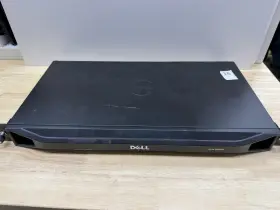
( Brand: Dell ), ( Type: Cable ), ( Manufacturer Part Number: R2HH2 )
Review DELL Kvm Port Remote Console Switch
The Dell R2HH2 KVM 1082DS Port Remote Console Switch is a versatile and efficient solution for managing multiple servers or computers in a data center environment. This KVM switch allows you to connect and console manage up to 16 Dell PowerEdge R810, R710, R610, R510, T610, or T410 servers or computers using a single set of keyboard, video, and mouse peripherals.
This particular model, the Dell R2HH2, comes with an additional feature of built-in iDRAC or DRAC remote management support for select Dell servers. This means you can manage your servers remotely over the network, making it more convenient and accessible, especially for out-of-band management and troubleshooting.
The KVM switch supports both VGA and HDMI video outputs, allowing you to connect to servers with different video interfaces. It also offers audio support via a 3.5mm headphone jack, enabling you to listen to system beeps or other audio output from the connected servers.
The KVM switch features a user-friendly, ergonomically designed console with a full-sized, backlit keyboard, and a large, 15-inch LCD display. This console allows you to switch between connected servers with just a press of a button, making it easy to multitask and manage multiple systems.
The Dell R2HH2 KVM 1082DS Port Remote Console Switch also comes with a power strip that can support up to 16 servers, providing a centralized power management solution. It offers various safety features, such as surge protection and automatic shutdown, ensuring the protection of your connected equipment.
This KVM switch is designed with a robust, industrial-grade construction, ensuring durability and long-lasting performance in a data center environment. It also offers energy-efficient features, such as power-saving modes and automatic power-off when no servers are detected, contributing to cost savings and reduced energy consumption.
In summary, the Dell R2HH2 KVM 1082DS Port Remote Console Switch is an essential tool for managing multiple servers or computers in a data center environment. It offers versatile connectivity options, built-in remote management support, ergonomic design, centralized power management, and robust construction, making it a reliable and efficient solution for streamlining your server management tasks.
The Dell R210 II KVM Switch Model R2HH2 (1082DS) is a remote console solution designed to manage multiple servers or devices using a single keyboard, video display, and mouse. Here are some pros and cons that may help you decide if this KVM switch is the right choice for your needs:
Pros:1. Cost-effective: The R2HH2 KVM switch allows you to manage multiple servers or devices from a single console, reducing the need for multiple monitors, keyboards, and mice.
2. Increased efficiency: By consolidating the management of multiple servers or devices into a single console, you can save time and effort, making system administration more efficient.
3. Improved security: The KVM switch offers secure access to your servers or devices, allowing you to restrict access to authorized personnel only.
4. Flexible configuration: The R2HH2 KVM switch supports up to 16 servers or devices, allowing you to configure the switch to meet your specific needs.
5. Easy to use: The KVM switch is easy to set up and use, with a user-friendly interface and intuitive controls.
Cons:1. Limited distance: The KVM switch has a limited cable length, so it may not be suitable for managing servers or devices that are located far away.
2. Compatibility issues: Some users have reported compatibility issues with certain operating systems or hardware, so it's essential to check the compatibility of the switch with your servers or devices before making a purchase.
3. Power management: The KVM switch does not provide power to the connected servers or devices, so you will need to use separate power sources for each device.
Conclusion:The Dell R2HH2 KVM Switch Model R2HH2 (1082DS) offers several advantages, including cost savings, increased efficiency, improved security, flexible configuration, and ease of use. However, it also has some limitations, such as limited distance, compatibility issues, and lack of power management. If your servers or devices are located close by, and you don't have any compatibility issues, the R2HH2 KVM switch can be an excellent investment to simplify your system administration tasks. If you require longer cable lengths, power management, or more advanced features, you may want to consider other KVM switch models.
Recommendation:If you have multiple servers or devices located in a relatively small area, and you don't have any compatibility issues, the Dell R2HH2 KVM Switch Model R2HH2 (1082DS) can be an excellent investment for your IT infrastructure. It offers cost savings, increased efficiency, improved security, flexible configuration, and ease of use, making system administration more manageable and less time-consuming. However, if you have more advanced requirements, such as longer cable lengths, power management, or more advanced features, you may want to consider other KVM switch models that better suit your needs.
Details:
Rails are bent. No power cord included. Scratches and scuffs. No cables Box only.
No accessories. Used conditions.
part #: r2hh2 prices
- $98.88-$370.00
specifications serversappy:
- brand: Dell
- type: Cable
- manufacturer part number: R2HH2
shipping serversappy:
- carrier: USPS
- class: Standard
- service: USPS Ground Advantage
- transit: 3-8 Days
- cost: $0.00
- type: Calculated
returns serversappy:
- policy: No Returns
seller serversappy:
- # reviews: 1103
- rating: 98.6%
- city: Sterling, Virginia
offer serversappy:
- availability: In Stock
- sold: 0
- options: Ship-to-home
- started: April 9, 2025
- quantity: 1
general serversappy:
- condition: Used
- Enterprise Networking, Servers > Server Components > Other Ent Server Components
payments serversappy:
- credit card: Discover
- other
- wallet: Apple-pay
Dell R2HH2 Is Similar To:
- Dell Bcm5708 Broadcom Dual Port Mezzanine Card (39.6% similar) Condition is used. Dell broad com BCM5708 dual port mezzanine card. Shipped with USPS ground advantage...(July 22nd, 2024)
- Dell K036d Lot Of 3 M1000e Ikvm Switch Enclosure Module 700-392-503 610-375-509 (31% similar) Technology trader is an independent distribution channel and not associated with hp, Dell, AMD, Cisco, Emile's, intel, Hitachi, IBM, logic, Samsung, sea gate, sun, western digital all other mentioned above. All the logos used are propriety to their respective owners and technology trader does...(July 23rd, 2024)
- Dell 0fwgj8 Dual-port Usb 3.0 Pcie Expansion Card Low Profile Tested Usa (34.4% similar) Need it faster. This item is pulled from a working system. This will not impact compatibility or functionality. 60-DAY free return/warranty period. Dell dual-port USB 3.0 pie expansion card low profile 0FWGJ8 tested fast shipping USA!!: please verify compatibility prior to purchase...(July 24th, 2024)
- Dell 03t3t7 Emulex Lpe31000 Single Port Hba Fh With 16gbps Sfp Transciever (35.5% similar) Dell 03T3T7 Emile's LPE31000 single port BA FHA with 16 GPS SPF model: avg AFR-57F5MZ-LX 850NM...(July 26th, 2024)
- Dell Mellanox Cx353a Lot2 40gbps Single Port Qsfp Pci-e 3.0 Network Adapter (32% similar) Software may not be loaded or configured. Damage to latches, hinges, keyboards, etc. Minor wear of labeling may be visible. Brand: melanges. Critical parts are missing. Zero defects. New, out of box, unused equipment removed from the original packaging with no signs wear or alteration...(July 26th, 2024)
- Dell 540-bbcb Intel I350 12gb Quad-port 1gb Rndc Removable Network Daughter Card (35.4% similar) All Dell HBase network adapters hardware is fully tested and ready to ship. Condition: used. All equipment is eligible for existing oem or 3RD party maintenance plans. Data sanitation: non-data device controlled status: cosmetic code: used good functional f4 fully tested...(July 26th, 2024)
- Dell 0737wf Intel I350 12gb Quad-port 1gbe Rndc Removable Network Daughter Card (35.7% similar) All Dell HBase network adapters hardware is fully tested and ready to ship. Part number: 0737WF. All equipment is eligible for existing oem or 3RD party maintenance plans.: Dell 0737WF intel I350 12GB quad-port 1GBE Rand removable network daughter card. Condition: used...(July 26th, 2024)
- Dell 430-4447 Intel I350 12gb Quad-port 1gb Rndc Removable Network Daughter Card (35.4% similar) Part number: 430-4447. All Dell HBase network adapters hardware is fully tested and ready to ship.: Dell 430-4447 intel I350 12GB quad-port 1GB Rand removable network daughter card. All equipment is eligible for existing oem or 3RD party maintenance plans. Condition: used...(July 26th, 2024)
- Dell 540-bbdd Intel I350 12gb Quad-port 1gb Rndc Removable Network Daughter Card (35.4% similar) Dell 540-BUDDY intel I350 12GB quad-port 1GB Rand removable network daughter card. Data sanitation: non-data device controlled status: cosmetic code: used good functional f4 fully tested. All Dell HBase network adapters hardware is fully tested and ready to ship. All equipment is...(July 26th, 2024)
- Dell 6w1hy Connectx-4 Single Port 100gb Qsfp Full Height Adapter Cx445a 06w1hy (32.8% similar) The adapter is designed to work with HBase network adapters and compatible a variety of devices. It has a unit quantity of 1 and is categorized under computers/tablet's networking, enterprise servers, server components, other net. With its full height design, it offers a secure and stable...(August 1st, 2024)
- Dell 00nwk2 Intel I350-t4 Nic Quad-port Gigabit Ethernet Server Adapter Pcie (28.6% similar) Condition, used, warranty, 30-DAY warranty. Not available for this item. Dell 00NWK2 intel I350-T4 Nick quad-port gigabit Ethernet server adapter pie. Original packaging must remain intact. 00NWK2 no manuals, software, cables, or accessories included, sold as pictured. Misc information...(August 1st, 2024)

5 offers $98.88–$370.00 USD
- Open box. Offer #1 priced at $370.00 + $0.00 delivery = $370.00* total. Dell KVM 8 Port Remote Console Switch With rails no cables.FREE SHIPPING
- Gebraucht. Offer #2 priced at $230.94 + $261.11 delivery = $492.05* total. +$261.11 shipping
- Used. Offer #3 priced at $98.88 + $0.00 delivery = $98.88* total. No cables Box only. Don t on back side.FREE SHIPPING
- Used. Offer #4 priced at $220.00 + $15.00 delivery = $235.00* total. Dell KVM Remote Console Switch.+$15.00 shipping
- Used. Offer #5 priced at $284.24 + $111.48 delivery = $395.72* total. While great care is taken, any errors or omissions in the item details are unintentional. DELL 8 PORT KVM SWITCH.+$111.48 shipping