DELL KHKN5 Pci Server Fibre Channel Passthrough Mezzanine Card
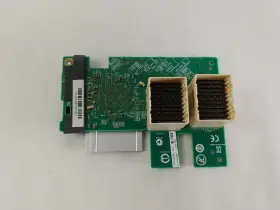
( Brand: Dell ), ( Manufacturer Part Number: KHKN5 ), ( Type: Fibre Channel Passthrough Mezzanine Card ), ( Unit Type: Unit ), ( Machine Type: Server ), ( Compatible Model: Poweredge Fc630 )
Review DELL Pci Express Server Fibre Channel Passthrough Mezzanine Card
The Dell Khkn5 PCI Server Fiber Channel Passthrough Mezzanine Card is a high-performance expansion solution designed for Dell PowerEdge servers. This mezzanine card allows for the direct connection of Fiber Channel storage devices to the server, eliminating the need for a separate HBA (Host Bus Adapter).
The Dell Khkn5 PCI Server Fiber Channel Passthrough Mezzanine Card supports Fiber Channel SAN (Storage Area Network) connectivity, enabling servers to communicate with multiple storage devices over a single, high-speed connection. This can significantly improve data throughput and reduce network latency, making it ideal for applications that require high I/O performance, such as databases, virtualization, and backup and recovery.
The mezzanine card features two 8Gbps Fiber Channel ports, each supporting up to 16 Gbps Fibre Channel data transfer rates using 8Gbps SFP connectors. It supports both FC-AL (Fibre Channel Arbitrated Loop) and FC-SW (Fibre Channel Switched) topologies, allowing for flexible network configuration options.
The Dell Khkn5 PCI Server Fiber Channel Passthrough Mezzanine Card is compatible with select Dell PowerEdge servers, including the R730, R740, R740xd, R750, and R930. It is also compatible with Windows Server, Red Hat Enterprise Linux, and other popular operating systems.
Overall, the Dell Khkn5 PCI Server Fiber Channel Passthrough Mezzanine Card is a powerful and reliable expansion solution for Dell PowerEdge servers, providing high-speed Fiber Channel connectivity for storage devices and improving data transfer performance for demanding applications.
Pros of buying Dell KHKN5 PCI Server Fiber Channel Passthrough Mezzanine Card:1. High performance: The Dell KHKN5 provides a high-speed connection, which is ideal for data-intensive applications such as virtualization, databases, and backup.
2. Fiber optic connectivity: Fiber optic cables are more reliable and have a longer range compared to traditional copper cables. They are also less susceptible to electromagnetic interference.
3. Flexibility: The mezzanine card can be easily installed in a variety of Dell servers, providing flexibility in terms of server selection.
4. Cost-effective: Fiber Channel networks can be more cost-effective in the long run, as they require less cabling and can support a larger number of devices compared to other high-speed networking technologies.
Cons of buying Dell KHKN5 PCI Server Fiber Channel Passthrough Mezzanine Card:1. Complexity: Fiber Channel networks can be more complex to set up and manage compared to simpler networking technologies.
2. Cost: The initial cost of setting up a Fiber Channel network can be higher than other networking options.
3. Compatibility: Not all servers and applications support Fiber Channel, so it's important to check compatibility before making a purchase.
4. Limited availability: Fiber Channel mezzanine cards may not be as widely available as other types of network cards, which could make sourcing replacements or upgrades more difficult.
Conclusion:The Dell KHKN5 PCI Server Fiber Channel Passthrough Mezzanine Card is a high-performance option for servers that require fast, reliable data transfer. Its fiber optic connectivity is reliable and has a longer range compared to copper cables. However, it's important to consider the complexity and cost of setting up a Fiber Channel network, as well as compatibility with your servers and applications. If you require a high-speed network and are comfortable with the extra complexity, the Dell KHKN5 could be a good choice.
Recommendation:If you are in need of a high-performance network card for your server, I would recommend considering the Dell KHKN5 PCI Server Fiber Channel Passthrough Mezzanine Card. However, make sure to carefully evaluate your use case, server compatibility, and network requirements before making a purchase. It may be worth consulting with a network engineer or IT expert to ensure that this card is the best fit for your needs.
Details:
Only what is in the photo included sale. Also visually inspected for defects. Good Condition. This compatibility should be obtained by comparing the model and part number of item from listing to one that customer is attempting replace.
ORDERS, Our system will combine order automatically if they fall within a set of guidelines. Testing Procedure, Key Functions Test Expected Result, Allow a user to connect other devices computer Check that the card is recognized Card visible in device manager Pass, Verify connection active by connecting peripheral The functions as expected Pass. If a part is not shown in the photos, then it included sale of this item. If possible, include photos or video to assist in understanding the problem.
Tested in original machine under load conditions and working before removal from.
part #: khkn5 prices
- $18.95-$64.00
specifications serversappy:
- brand: Dell
- manufacturer part number: KHKN5
- type: Fibre Channel Passthrough Mezzanine Card
- unit type: Unit
- machine type: Server
- compatible model: Poweredge Fc630
seller serversappy:
- city: Indianapolis, Indiana
- rating: 99.6%
- # reviews: 81191
returns serversappy:
- method: Money back
- time: 30 Days
- paid by: Seller
- policy: Returns Accepted
general serversappy:
- Enterprise Networking, Servers > Server Components > Other Ent Server Components
- condition: Used
shipping serversappy:
- type: Calculated
- class: Standard, Expedited, One-day
- cost: $0.00
- service: USPS Ground Advantage, UPS Ground, USPS Priority Mail, UPS Next Day Air Saver
- carrier: USPS, UPS
- transit: 5-10 Days
payments serversappy:
- wallet: Apple-pay
- other
- credit card: Visa
offer serversappy:
- started: September 17, 2024
- availability: In Stock
- sold: 0
- quantity: 1
- options: Ship-to-home
Dell KHKN5 Is Similar To:
- Dell 4pg76 Poweredge 2u Server Front Bezel P n 04pg76 Tested Grade B (42.3% similar) Any parts not photographed will not be included. Dell poweredge 2u server front bezel p/n: 4PG76 tested working please carefully review the photos and details of item before purchasing to avoid buying incorrect. Cosmetic issues are not covered...(July 21st, 2024)
- Dell 0800jh 800jh Slot 6 Pcie 3.0 X16 Riser 3 Card For Poweredge R730xd R730 (32% similar) That fact may be exhibited in possible wear and tear associated with normal everyday use. Shipping is free. This is a used item. It is ideal for those who are looking other enterprise server components. There are not too many problems that cannot be rectified, if we communicate...(July 21st, 2024)
- Dell 0y446j Y446j Lot Of 10 Poweredge Tray For R410 And R510 3.5 Inch Non Hot Plug (23.1% similar) No screws included. Lot of 10 Dell poweredge tray Y446J for R410 and R510 3.5 non hot plug...(July 21st, 2024)
- Dell 0jpvhw 16gb Idrac Vflash C10 Sdhc Sd Card Module 13 Gen R630 R730 Jpvhw (26.7% similar) Few items are new and would be specifically labeled as such. On rare occasions, damages may occur while in transit. Is it too late. What is the condition of item I receive. Dutchmen is a proud member of the Microsoft registered refurbished program. I placed an order, but want to make a...(July 21st, 2024)
- Dell 0h1h8m 16gb Idrac Vflash C10 Sdhc Sd Card Module 13 Gen R630 R730 H1h8m (25.3% similar) Each product is tested and in good working condition when it shipped. I placed an order, but want to make a change. Shipping info: orders placed before 1PM est will predominantly ship on the same day as they were. On rare occasions, damages may occur while in transit. Dell poweredge...(July 21st, 2024)
- Dell 037d9d 16gb Idrac Vflash C10 Sdhc Sd Card Module 13 Gen R630 R730 37d9d (28% similar) Few items are new and would be specifically labeled as such. Do you ship outside of the USA...(July 21st, 2024)
- Dell Bcm5708 Broadcom Dual Port Mezzanine Card (46.7% similar) Condition is used. Dell broad com BCM5708 dual port mezzanine card. Shipped with USPS ground advantage...(July 22nd, 2024)
- Dell Ffw09 2x Fh Pcie X16 Riser 1 Card 2u R1c For Poweredge R7525 (34.5% similar) 2x full height pci express X16 riser 1c assembly for Dell poweredge R7525 servers...(July 22nd, 2024)
- Dell Cmd3m Tpm Trusted Platform Module 1.2 14g For R640 R740 T440 T640 (25% similar) Working in perfect conditions. Check to see if this part is compatible with your system before purchasing. Dell Tom trusted platform module 1.2 14G for R640 R740 T440 T640 CMD3M. 14-DAY DOA warranty. Blind shipping on request...(July 22nd, 2024)
- Dell 05nv48 5nv48 Pcie X16 Riser 2c Card For Poweredge R450 (36.1% similar) Pci express X16 riser 2c card for Dell poweredge R450 servers...(July 22nd, 2024)
- Dell Kkp8d Server Vflash Media Reader For Poweredge R720 (43.1% similar) Orders, our system will combine order automatically if they fall within a set of guidelines. Good condition. Also visually inspected for defects. If possible, include photos or video to assist in understanding the problem. Tested in original machine under load conditions and working...(July 23rd, 2024)

5 offers $18.95–$64.00 USD
- Used. Offer #1 priced at $18.95 + $0.00 delivery = $18.95* total. Eden Prairie, MN. Core 4 Solutions, Inc.FREE SHIPPING
- Used. Offer #2 priced at $29.99 + $0.00 delivery = $29.99* total. Allow a user to connect other devices to a computer Check that the card is recognized Card is visible in the device manager Pass. Server Components.FREE SHIPPING
- Used. Offer #3 priced at $64.00 + $0.00 delivery = $64.00* total. FREE SHIPPING
- Used. Offer #4 priced at $19.99 + $0.00 delivery = $19.99* total. Dell 6PR7H Poweredge R460 R660 R660XS Standard Fan. MPN: .FREE SHIPPING
- Used. Offer #5 priced at $11.49 + $0.00 delivery = $11.49* total. CompatibilityDell PowerEdge FC630, FC640, and FC830. This wired network adapter, with its plug-in card form factor, is designed to seamlessly integrate with Dell PowerEdge FC630, FC640, and FC830 servers.FREE SHIPPING