DELL Precision Sas Flex Bay Module 0JX33G T5820 T7820 T7920 M.2 AMA01
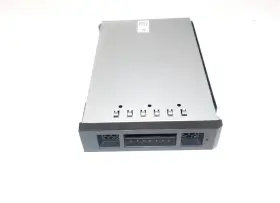
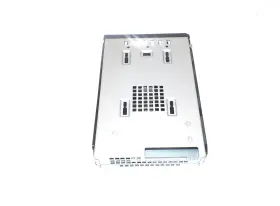
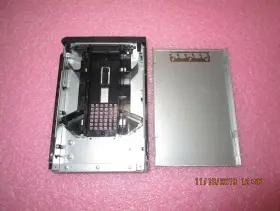
( Brand: Dell ), ( Type: Board ), ( Manufacturer Part Number: JX33G 0JX33G )
Review DELL Oem Precision M.2 To Sas Flex Bay Module
The Dell JX33G 0JX33G Precision T5820, T7820, T7920 M.2 SAS Flex Bay Module AMA01 is a versatile and high-performance storage expansion solution designed for Dell Precision T5820, T7820, and T7920 workstations. This module enables the installation of M.2 SAS (Small Form Factor Serial Attached SCSI) solid-state drives (SSDs) or NVMe drives, adding an additional level of storage capacity and data transfer speed to these powerful workstations.
The flex bay design of this module allows for easy installation and removal of drives, as well as the flexibility to accommodate drives of various lengths. This makes it an ideal solution for users who require the ability to upgrade or modify their storage configuration as needed. With support for M.2 2280 and M.2 22110 SAS SSDs, users can take advantage of the latest storage technologies to enhance their productivity and improve system performance.
The JX33G 0JX33G Precision T5820, T7820, T7920 M.2 SAS Flex Bay Module AMA01 is designed with a robust and reliable construction, ensuring reliable operation in demanding workstation environments. It also supports hot-plugging, allowing users to add or remove drives without needing to power down the system, saving valuable time and increasing system uptime.
In terms of performance, the M.2 SAS interface provides exceptional data transfer speeds, allowing users to quickly and efficiently move large files and data sets. The module also offers robust data protection features, including support for RAID 0, 1, 5, and 10 configurations, ensuring that critical data is safeguarded against data loss.
Overall, the Dell JX33G 0JX33G Precision T5820, T7820, T7920 M.2 SAS Flex Bay Module AMA01 is a must-have accessory for professionals who require high-performance storage capabilities and the flexibility to customize their workstation setup. It is an investment in enhanced productivity and peace of mind, enabling users to confidently manage their data and tackle even the most demanding workloads.
Pros and Cons of Buying Dell JX33G M.2 SAS Flex Bay Module (AMA01) for Dell Precision T5820, T7820, and T7920
Introduction:The Dell JX33G M.2 SAS Flex Bay Module AMA01 is a versatile storage expansion solution designed for Dell Precision T5820, T7820, and T7920 workstations. This module enables users to add M.2 SAS SSDs to their systems, providing faster data access and enhanced productivity. In this analysis, we will outline the primary advantages and disadvantages of purchasing this module.
Pros:1. High-Performance SAS Storage: The Dell JX33G M.2 SAS Flex Bay Module AMA01 supports M.2 SAS SSDs, providing faster read and write speeds compared to SATA SSDs or traditional HDDs. This makes it a suitable choice for data-intensive workloads and applications.
2. Flexible Design: The module's flexible design caters to various installation positions, allowing users to install it in a vertical or horizontal orientation, ensuring easier installation and a better fit in limited space environments.
3. Easy Installation: The installation process is relatively simple, as it only requires replacing the existing drive bay. Dell provides clear instructions and offers comprehensive technical support to facilitate the installation.
4. Compatibility: The module is specifically designed and certified for Dell Precision T5820, T7820, and T7920 workstations, ensuring reliable operation and eliminating compatibility concerns.
5. Scalability: With the ability to add multiple drives, users can expand their storage capacity as needed and customize their system configurations to suit their evolving requirements.
Cons:1. Cost: The Dell JX33G M.2 SAS Flex Bay Module AMA01 is a premium storage expansion solution, and the cost for this module can be significantly higher than that of traditional HDDs or standard SATA SSDs.
2. Limited Capacity: While the module supports multiple M.2 SAS SSDs, the capacity of each individual drive is a limiting factor. Users may require multiple drives to accommodate larger storage needs, which could add to the overall cost and complexity.
3. Compatibility with Thin Clients: The Dell JX33G M.2 SAS Flex Bay Module AMA01 is designed for Dell Precision workstations only. It may not be compatible with other thin clients or lower-end systems, thus limiting its applicability across a broader range of solutions.
4. Heat Management: M.2 SAS SSDs generate more heat compared to SATA SSDs or traditional HDDs. Proper heat management should be considered when installing multiple drives in a confined space, as this could negatively impact their performance and lifespan.
Conclusion:The Dell JX33G M.2 SAS Flex Bay Module AMA01 offers several benefits, including high-performance SAS storage, flexibility, easy installation, compatibility, and scalability. However, it comes with certain drawbacks, such as higher costs, limited capacity, and compatibility with only specific Dell Precision workstations. Ultimately, the decision to invest in this module should be based on the user's specific storage needs, budget, and the systems they are using.
Recommendation: This module is recommended for Dell Precision T5820, T7820, and T7920 users who require the highest performance, have the necessary budget, and need to expand their storage capacity beyond what traditional HDDs or SATA SSDs can provide. For users with limited storage requirements, budget constraints, or who use thin clients other than the specified Dell Precision workstations, alternative expansion solutions may be a more appropriate choice.
Details:
Lock: N67 AMA01. Part number Compatible with. Precision T5820 T7820 T7920. Flex Bay Module as shown.
JX33G 0JX33G.
part #: jx33g prices
- $39.95-$112.99
specifications serversappy:
- brand: Dell
- type: Board
- manufacturer part number: JX33G 0JX33G
seller serversappy:
- rating: 99.8%
- # reviews: 89936
- city: Round Rock, Texas
returns serversappy:
- time: 30 Days
- paid by: Seller
- method: Money back
- policy: Returns Accepted
general serversappy:
- condition: Used
- Enterprise Networking, Servers > Server Components > Other Ent Server Components
payments serversappy:
- other
- credit card: Mastercard
- wallet: Paypal
shipping serversappy:
- cost: $0.00
- class: Standard, Expedited
- service: Standard, Expedited, USPS Priority Mail Express
- type: Fixed
- carrier: USPS
- transit: 4-10 Days
offer serversappy:
- best offers: True
- availability: In Stock
- quantity: 1
- started: January 4, 2025
- options: Ship-to-home
- sold: 0
Dell JX33G Is Similar To:
- Dell 0jnmfw Poweredge C4130 160x90mm Thermal Module Sxm2-gpu Cooling Heatsink Jnmfw B (35.9% similar) No others please. The photos and the actual item may have 5-10% difference. Select a topic. Exchange on certain items. Lock: ROOM202-G. Dell power edge C4130 160X90MM thermal module SXM2-GPU cooling heat sink Jenifer a n technology solution...(July 21st, 2024)
- Dell 72hgp Poweredge R430 Mini Sas Sata Ssd Bp To Perc Cable Black 072hgp (36.1% similar) The listed prices do not apply. May have signs on wears...(July 21st, 2024)
- Dell 0jpvhw 16gb Idrac Vflash C10 Sdhc Sd Card Module 13 Gen R630 R730 Jpvhw (32.9% similar) Few items are new and would be specifically labeled as such. On rare occasions, damages may occur while in transit. Is it too late. What is the condition of item I receive. Dutchmen is a proud member of the Microsoft registered refurbished program. I placed an order, but want to make a...(July 21st, 2024)
- Dell 0h1h8m 16gb Idrac Vflash C10 Sdhc Sd Card Module 13 Gen R630 R730 H1h8m (30.4% similar) Each product is tested and in good working condition when it shipped. I placed an order, but want to make a change. Shipping info: orders placed before 1PM est will predominantly ship on the same day as they were. On rare occasions, damages may occur while in transit. Dell power edge...(July 21st, 2024)
- Dell 037d9d 16gb Idrac Vflash C10 Sdhc Sd Card Module 13 Gen R630 R730 37d9d (32.9% similar) Few items are new and would be specifically labeled as such. Do you ship outside of the USA...(July 21st, 2024)
- Dell 66xhv 066xhv Precision M.2 2tb Ssd Nvme Installed Sas Flex Bay Module (56.4% similar) May have data on it so please wipe all. Pulled from a working 7820 system...(July 21st, 2024)
- Dell Cmd3m Tpm Trusted Platform Module 1.2 14g For R640 R740 T440 T640 (30.3% similar) Working in perfect conditions. Check to see if this part is compatible with your system before purchasing. Dell Tom trusted platform module 1.2 14G for R640 R740 T440 T640 CMD3M. 14-DAY DOA warranty. Blind shipping on request...(July 22nd, 2024)
- Dell K036d Lot Of 3 M1000e Ikvm Switch Enclosure Module 700-392-503 610-375-509 (34.8% similar) Technology trader is an independent distribution channel and not associated with hp, Dell, AMD, Cisco, Emile's, intel, Hitachi, IBM, logic, Samsung, sea gate, sun, western digital all other mentioned above. All the logos used are propriety to their respective owners and technology trader does...(July 23rd, 2024)
- Dell 4f7v1 Lot Of 12 Gen 13 Poweredge 3.5ftft Hard Drive Hdd Bay Blank Filler 04f7v1 (26.5% similar) Capacity per module. We'll provide either a ups, FedEx, or USPS label for the return depending on exact item. We typically use ups or FedEx for larger packages. Dell servers. Dell power edge servers. Processor type...(July 23rd, 2024)
- Dell 57f8r Poweredge R7415 Perc 24-bay Mini Raid Cable Assembly (29% similar) Part #: Dell 57F8R for sale...(July 24th, 2024)
- Dell Ptm8m Poweredge Fx2s Pci-e Riser Module (33.3% similar) Our platforms. Rhino stocks just about all things hp, nimble, IBM, Dell, sun, Cisco, super micro and juniper, both new refurbished. Part number: PTM8M. Dell PTM8M power edge FX2S pic-e riser module: manufacturer: Dell. On the image below to get zoomed view of item. Ships: today...(July 24th, 2024)

5 offers $39.95–$112.99 USD
- Open box. Offer #1 priced at $46.99 + $0.00 delivery = $46.99* total. 1x Module as Pictured. M.2 Flexbay Module for Dell Precision 66XHV 066XHV without SSD.FREE SHIPPING
- New. Offer #2 priced at $112.99 + $0.00 delivery = $112.99* total. 3- Large FR Box. Dell Precision .FREE SHIPPING
- Used. Offer #3 priced at $39.95 + $0.00 delivery = $39.95* total. FREE SHIPPING
- Used. Offer #4 priced at $26.00 + $5.97 delivery = $31.97* total. With a sleek design and ample space for storing M.2 NVMe SAS drives, this tray is a practical and reliable solution for expanding storage capabilities in your computer system ALL HAVE BEEN TESTED & REMOVED FROM WORKING COMPUTERS.+$5.97 shipping
- Used. Offer #5 priced at $34.99 + $0.00 delivery = $34.99* total. Dell Precision M.2 NVMe SAS Flex Bay Module Tray.FREE SHIPPING