DELL Poweredge Media Bay Control Panel Cable R620 I/o 0H2P8J 1X
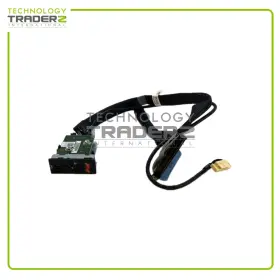
( Brand: Dell ), ( Type: Control Panel ), ( Manufacturer Part Number: H2P8J )
Review DELL Poweredge Media Bay I/o Control Panel 1x Cable
The Dell H2P-8J PowerEdge R620 Media Bay I/O Control Panel 0H2P8J is an essential component for managing various I/O functions in Dell PowerEdge R620 servers. This panel is designed specifically for the R620 model and offers a user-friendly interface for controlling media bay functions.
This I/O control panel comes with a single cable (0H2P8J) that connects the media bay to the server's motherboard. The cable features a Latching Flexible Data Bus Connector that ensures a secure connection while allowing flexibility in cable routing. The connector is designed to fit easily into the server's motherboard, making installation and removal processes straightforward.
The Media Bay I/O Control Panel offers several functionalities. It includes a power button and two LED status indicator lights that provide real-time information on the media bay's operational status. Additionally, it supports various media types, including CD, DVD, and Blu-ray drives. The panel is also designed to accommodate Dell's optional Smart Cards and other optional devices.
This I/O control panel is built with high-quality materials and undergoes rigorous testing to ensure reliability, durability, and compatibility with Dell PowerEdge R620 servers. It also adheres to industry standards and regulations, making it a safe and secure choice for your data center environment.
Installing the Dell H2P-8J PowerEdge R620 Media Bay I/O Control Panel 0H2P8J is a simple process. It requires no additional software or drivers, as the functionality is integrated into the server's BIOS. The cable is plug-and-play, meaning it connects automatically once installed. The control panel can be easily accessed from the front of the server, making it convenient for administrators to manage media bay functions without having to open the server's chassis.
In summary, the Dell H2P-8J PowerEdge R620 Media Bay I/O Control Panel 0H2P8J is a versatile and essential component for managing media bay functions in Dell PowerEdge R620 servers. It offers a user-friendly interface, reliable connectivity, and supports various media types. The single cable that comes with the control panel ensures a secure connection, and installation is a straightforward process. This I/O control panel is built with high-quality materials and undergoes rigorous testing to ensure compatibility and reliability, making it an excellent choice for data center environments.
The Dell H2P8J PowerEdge R620 Media Bay I/O Control Panel (Part Number 0H2P8J) is an optional expansion module for Dell PowerEdge R620 servers. This I/O controller offers additional connectivity options for your server, enhancing its functionality. Here are the pros and cons of buying this component:
Pros:1. Increased Flexibility: The I/O control panel provides an additional USB 2.0 and 2 eSATA/iSCSI ports. These ports can be used to connect various peripherals, such as external hard drives, tape libraries, or other devices.
2. Improved Management: The I/O control panel offers an integrated LCD display and buttons, allowing you to manage and monitor the connected devices directly from the server's chassis.
3. Redundancy: Installing an I/O control panel in the media bay can provide some level of redundancy, as it can take over control of the connected devices if the primary controller fails.
Cons:1. Additional Cost: The Dell H2P8J I/O control panel is not a standard component, and it comes at an additional cost. It may not be a necessary expense for all users, depending on their specific requirements.
2. Space Consideration: Installing the I/O control panel in the media bay will take up space that could be used for other expansion cards or drives.
3. Compatibility: Ensure that your server model and operating system support the use of the I/O control panel before making a purchase.
In conclusion, the Dell H2P8J PowerEdge R620 Media Bay I/O Control Panel can be a valuable addition to your PowerEdge R620 server if you require additional connectivity options or improved management capabilities. However, it comes with an additional cost and a space consideration. Therefore, it is essential to assess your specific requirements and determine if the benefits outweigh the costs before making a purchase.
Recommendation: If you frequently use external storage devices or need to manage them more efficiently, the Dell H2P8J I/O Control Panel could be a worthwhile investment. If, on the other hand, you have no need for the added functionality, it may be best to stick with the standard configuration of your PowerEdge R620 server.
Details:
Item Condition New others means item pulled from brand new system and does not have original Manufacturer packaging material. Item condition Refurbished means we pull the parts from working systems. 0-Hours on hard drives means the are never installed/used in a system and is brand new with No hour usage them. Technology Trader is an independent distribution channel and not associated with HP, DELL, AMD, CISCO, EMULEX, intel, HITACHI, IBM, Logic, SAMSUNG, Se agate, SUN, Western Digital all other mentioned above.
Part Number: H2P8J W/ Cable / 0H2P8J. All the logos used are propriety to their respective owners and Technology Trader does not have any authority over them. Or its subsidiaries in the USA and other countries.
part #: h2p8j prices
- $22.99-$39.95
specifications serversappy:
- brand: Dell
- type: Control Panel
- manufacturer part number: H2P8J
seller serversappy:
- # reviews: 13457
- rating: 99.4%
- city: Richardson, Texas
offer serversappy:
- options: Ship-to-home
- sold: 0
- quantity: 4
- started: August 16, 2025
- best offers: True
- availability: In Stock
general serversappy:
- Enterprise Networking, Servers > Server Components > Other Ent Server Components
- condition: Used
payments serversappy:
- wallet: Paypal
- credit card: Discover
- other
shipping serversappy:
- transit: 4-6 Days
- class: Standard
- cost: $0.00
- type: Fixed
- service: Standard
returns serversappy:
- method: Money back
- policy: Returns Accepted
- paid by: Buyer
- time: 30 Days
Dell H2P8J Is Similar To:
- Dell 0jnmfw Poweredge C4130 160x90mm Thermal Module Sxm2-gpu Cooling Heatsink Jnmfw B (39% similar) No others please. The photos and the actual item may have 5-10% difference. Select a topic. Exchange on certain items. Lock: ROOM202-G. Dell poweredge C4130 160X90MM thermal module SXM2-GPU cooling heat sink Jenifer a n technology solution...(July 21st, 2024)
- Dell 72hgp Poweredge R430 Mini Sas Sata Ssd Bp To Perc Cable Black 072hgp (49% similar) The listed prices do not apply. May have signs on wears...(July 21st, 2024)
- Dell 4pg76 Poweredge 2u Server Front Bezel P n 04pg76 Tested Grade B (43.7% similar) Any parts not photographed will not be included. Dell poweredge 2u server front bezel p/n: 4PG76 tested working please carefully review the photos and details of item before purchasing to avoid buying incorrect. Cosmetic issues are not covered...(July 21st, 2024)
- Dell 0800jh 800jh Slot 6 Pcie 3.0 X16 Riser 3 Card For Poweredge R730xd R730 (29.3% similar) That fact may be exhibited in possible wear and tear associated with normal everyday use. Shipping is free. This is a used item. It is ideal for those who are looking other enterprise server components. There are not too many problems that cannot be rectified, if we communicate...(July 21st, 2024)
- Dell 0y446j Y446j Lot Of 10 Poweredge Tray For R410 And R510 3.5 Inch Non Hot Plug (37.2% similar) No screws included. Lot of 10 Dell poweredge tray Y446J for R410 and R510 3.5 non hot plug...(July 21st, 2024)
- Dell 66xhv 066xhv Precision M.2 2tb Ssd Nvme Installed Sas Flex Bay Module (29.7% similar) May have data on it so please wipe all. Pulled from a working 7820 system...(July 21st, 2024)
- Dell Cn-okp013 Poweredge Power And Usb Circuit Board Spare Parts Tested Working (37.9% similar) With the brand name Dell, you can be assured of quality and durability this board. Pulled from a working environment. Get your hands on this essential board today and keep server running smoothly. It is a great choice for those in need of replacement or spare parts their server...(July 21st, 2024)
- Dell Ddt01 Poweredge T60 Front Cover With Key (52.1% similar) Dell poweredge T60 front cover DDT01 w/ key, condition information whats included, includes: key.these items have been tested, and are guaranteed to be in good working condition. And computer equipment of all kinds. If a specific delivery type is required .e. Outer case may show some minor...(July 22nd, 2024)
- Dell Ffw09 2x Fh Pcie X16 Riser 1 Card 2u R1c For Poweredge R7525 (27.3% similar) 2x full height pic express X16 riser 1c assembly for Dell poweredge R7525 servers...(July 22nd, 2024)
- Dell 05nv48 5nv48 Pcie X16 Riser 2c Card For Poweredge R450 (28.6% similar) Pic express X16 riser 2c card for Dell poweredge R450 servers...(July 22nd, 2024)
- Dell 0k617r Poweredge T110 Front I o Control Panel Board P n Tested Working (53.7% similar) We must receive return/exchange items. Cosmetic issues are not covered under the guarantee. Dell poweredge T110 front i/o control panel board p/n: 0K617R tested working, please carefully review the photos and details of item before purchasing to avoid buying incorrect...(July 22nd, 2024)

5 offers $22.99–$39.95 USD
- Used. Offer #1 priced at $22.99 + $0.00 delivery = $22.99* total. All the logos used are propriety to their respective owners and Technology Traderz does not have any authority over them Part Number: W/ Cable / 0 .FREE SHIPPING
- New. Offer #2 priced at $39.95 + $0.00 delivery = $39.95* total. FREE SHIPPING
- New. Offer #3 priced at $29.00 + $0.00 delivery = $29.00* total. Installation Guide. Dell part number 2J1CF.FREE SHIPPING
- Used. Offer #4 priced at $7.29 + $0.00 delivery = $7.29* total. CompatibilityDell PowerEdge Servers. Invest in the best to keep your systems running smoothly.FREE SHIPPING
- New. Offer #5 priced at $26.99 + $0.00 delivery = $26.99* total. P/N: 2J1CF.FREE SHIPPING