DELL FP332 Riser Board Pci Poweredge
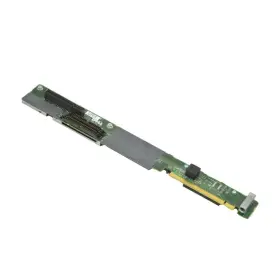
( Brand: Dell ), ( Type: Side Riser Board ), ( Manufacturer Part Number: FP332 )
Review DELL Side Riser Board Pci e Poweredge
The Dell FP332 Riser Board is a PCI-Express expansion solution designed specifically for Dell PowerEdge 1950 servers. This riser board provides an efficient way to add PCI-Express expansion cards to your server without occupying precious rack space.
The Dell FP332 Riser Board supports up to two full-length, full-height PCI-Express 2.0 x8 expansion cards or one full-length, full-height PCI-Express 2.0 x16 expansion card and one half-length, half-height PCI-Express 2.0 x4 expansion card. The board also comes with two 6-pin PCI-Express power connectors to ensure your expansion cards receive adequate power.
The riser board is designed with a robust and durable construction. It features a high-density design that maximizes the usage of the available space in your server rack. The board also comes with integrated cable management features that help keep your cabling neat and organized, reducing the risk of cable damage and improving airflow within the server.
The Dell FP332 Riser Board is easy to install. It simply slides into the available PCI-Express expansion slot on the back of the PowerEdge 1950 server chassis. The board is also hot-plug compatible, which means you can install, remove, or replace expansion cards while the server is running, without having to power down the server.
Overall, the Dell FP332 Riser Board is an ideal solution for businesses and data centers looking to add PCI-Express expansion capabilities to their PowerEdge 1950 servers without sacrificing valuable rack space. Its robust construction, efficient design, and easy installation make it a reliable and versatile expansion option for a wide range of applications.
The Dell FP332 Riser Board for PCIe expansion in the PowerEdge 1950 server is a product designed to provide additional PCIe expansion slots to the server. Here are some potential pros and cons of purchasing this riser board:
Pros:1. Increased Flexibility: The FP332 riser board allows you to add more PCIe cards to your PowerEdge 1950 server, enabling you to expand its capabilities to meet your specific requirements.
2. Improved Performance: Adding more PCIe cards can lead to improved performance, particularly if you're working with data-intensive applications or running multiple virtual machines.
3. Future-Proofing: By investing in additional PCIe slots now, you may be able to future-proof your server and avoid the need for an expensive upgrade in the near future.
Cons:1. Cost: The FP332 riser board and the additional PCIe cards it allows you to install can be expensive, and you'll need to factor in the cost of the riser board itself, as well as the cost of the PCIe cards and any necessary cabling.
2. Complexity: Installing the FP332 riser board and additional PCIe cards can be a complex process, and you may need to engage the services of a qualified IT professional to ensure that everything is installed correctly and functioning optimally.
3. Power Consumption: Adding more PCIe cards to your server can increase power consumption, which could lead to higher electricity bills and an increased carbon footprint.
In conclusion, the decision to purchase the Dell FP332 Riser Board for PCIe expansion in the PowerEdge 1950 server depends on your specific requirements and budget. If you have a need for increased flexibility, improved performance, or future-proofing, then the riser board may be a worthwhile investment. However, if the cost, complexity, and power consumption concerns outweigh the benefits for your organization, then it may be worth considering alternative solutions. Ultimately, careful consideration of your IT infrastructure needs and a thorough cost-benefit analysis will help you make an informed decision.
Recommendation: If you have a clear need for additional PCIe expansion slots in your PowerEdge 1950 server, then the FP332 riser board can be a valuable investment. However, it's essential to weigh the potential benefits against the cost, complexity, and power consumption concerns to ensure that it's the best solution for your organization. If you're unsure, it may be worth consulting with an IT professional to explore alternative options and determine the most cost-effective and efficient solution for your specific requirements.
Details:
Installed in the left front corner of server and has plugs for RAID controller, optical drive system board. Refurbished tested. Removed from a working Dell PowerEdge 1950 server. Dell FP332 Side Riser Board PCI-E PowerEdge 1950: P/N.
Cables are not included.
part #: fp332 prices
- $7.99-$39.95
specifications serversappy:
- brand: Dell
- type: Side Riser Board
- manufacturer part number: FP332
shipping serversappy:
- cost: $20.36
- class: Standard, Expedited
- transit: 2-4 Days
- carrier: UPS
- service: UPS Ground, UPS 3 Day Select, UPS 2nd Day Air
- type: Calculated
offer serversappy:
- availability: In Stock
- started: April 22, 2025
- options: Ship-to-home
- quantity: 7
- sold: 0
seller serversappy:
- # reviews: 5077
- city: Hamel, Minnesota
- rating: 100.0%
returns serversappy:
- time: 30 Days
- policy: Returns Accepted
- method: Money back
- paid by: Buyer
general serversappy:
- Enterprise Networking, Servers > Server Components > Other Ent Server Components
- condition: Used
payments serversappy:
- wallet: Paypal
- credit card: Mastercard
- other
Dell FP332 Is Similar To:
- Dell 0jnmfw Poweredge C4130 160x90mm Thermal Module Sxm2-gpu Cooling Heatsink Jnmfw B (27.1% similar) No others please. The photos and the actual item may have 5-10% difference. Select a topic. Exchange on certain items. Lock: ROOM202-G. Dell poweredge C4130 160X90MM thermal module SXM2-GPU cooling heat sink Jenifer a n technology solution...(July 21st, 2024)
- Dell 72hgp Poweredge R430 Mini Sas Sata Ssd Bp To Perc Cable Black 072hgp (29.8% similar) The listed prices do not apply. May have signs on wears...(July 21st, 2024)
- Dell 4pg76 Poweredge 2u Server Front Bezel P n 04pg76 Tested Grade B (31% similar) Any parts not photographed will not be included. Dell poweredge 2u server front bezel p/n: 4PG76 tested working please carefully review the photos and details of item before purchasing to avoid buying incorrect. Cosmetic issues are not covered...(July 21st, 2024)
- Dell 0800jh 800jh Slot 6 Pcie 3.0 X16 Riser 3 Card For Poweredge R730xd R730 (51.6% similar) That fact may be exhibited in possible wear and tear associated with normal everyday use. Shipping is free. This is a used item. It is ideal for those who are looking other enterprise server components. There are not too many problems that cannot be rectified, if we communicate...(July 21st, 2024)
- Dell 0y446j Y446j Lot Of 10 Poweredge Tray For R410 And R510 3.5 Inch Non Hot Plug (33.8% similar) No screws included. Lot of 10 Dell poweredge tray Y446J for R410 and R510 3.5 non hot plug...(July 21st, 2024)
- Dell Cn-okp013 Poweredge Power And Usb Circuit Board Spare Parts Tested Working (26.8% similar) With the brand name Dell, you can be assured of quality and durability this board. Pulled from a working environment. Get your hands on this essential board today and keep server running smoothly. It is a great choice for those in need of replacement or spare parts their server...(July 21st, 2024)
- Dell Ddt01 Poweredge T60 Front Cover With Key (38.7% similar) Dell poweredge T60 front cover DDT01 w/ key, condition information whats included, includes: key.these items have been tested, and are guaranteed to be in good working condition. And computer equipment of all kinds. If a specific delivery type is required .e. Outer case may show some minor...(July 22nd, 2024)
- Dell Ffw09 2x Fh Pcie X16 Riser 1 Card 2u R1c For Poweredge R7525 (58.4% similar) 2x full height pci express X16 riser 1c assembly for Dell poweredge R7525 servers...(July 22nd, 2024)
- Dell 05nv48 5nv48 Pcie X16 Riser 2c Card For Poweredge R450 (59.8% similar) Pci express X16 riser 2c card for Dell poweredge R450 servers...(July 22nd, 2024)
- Dell 0k617r Poweredge T110 Front I o Control Panel Board P n Tested Working (30.9% similar) We must receive return/exchange items. Cosmetic issues are not covered under the guarantee. Dell poweredge T110 front i/o control panel board p/n: 0K617R tested working, please carefully review the photos and details of item before purchasing to avoid buying incorrect...(July 22nd, 2024)
- Dell 0kw180 Kw180 Poweredge Fc630 104mm Cpu1 High Performance Heatsink 135w Screw Down 5jngy (25.7% similar) Dell poweredge FC630 104MM CPU1 high performance heat sink 135W screw down 5 Jung. No others please. Exchange on certain items. Select a topic. A n technology solution. The photos and the actual item may have 5-10% difference...(July 22nd, 2024)

5 offers $7.99–$39.95 USD
- Used. Offer #1 priced at $7.99 + $0.00 delivery = $7.99* total. Other Notes of Interest.FREE SHIPPING
- Used. Offer #2 priced at $39.95 + $0.00 delivery = $39.95* total. Part Number: .FREE SHIPPING
- Used. Offer #3 priced at $39.95 + $0.00 delivery = $39.95* total. Part Number: 0 .FREE SHIPPING
- New. Offer #4 priced at $13.99 + $0.00 delivery = $13.99* total. FREE SHIPPING
- Offer #5 priced at $10.00 + $10.19 delivery = $20.19* total. Dell Sideplane Board PE1950.+$10.19 shipping