KYOCERA KP-5006-C Control Panel 903864646399 KP-5005-A KM5035 KM3035 KM4035
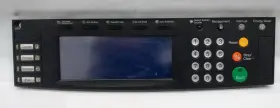
( Brand: Kyocera ), ( Part Type: Control Panel ), ( UPC: 903864646399 )
Review KYOCERA Control Panel
The Kyocera KP-5005-A and KP-5006-C control panels are designed to offer superior functionality and ease of use for various Kyocera copier models, including the KM-5035, KM-3035, and KM-4035. These control panels are engineered to provide an intuitive user experience, making it simple for operators to navigate through various functions and settings.
The KP-5005-A and KP-5006-C control panels feature a high-resolution, 10.1-inch touchscreen display, offering crisp and clear visibility of all menus and icons. The touchscreen is designed to be responsive, allowing users to quickly navigate through the system and make adjustments with the touch of a finger.
Both control panels are equipped with a range of advanced features to enhance productivity and streamline workflows. These include one-touch job customization, allowing users to save frequently used settings for quick access; customizable home screens, allowing users to set up the screen to display their most frequently used functions; and a built-in document scanner, enabling users to scan documents directly from the control panel.
The KP-5005-A and KP-5006-C control panels also offer advanced security features, including secure print release and encrypted communication between the control panel and the copier. These features help ensure that sensitive documents remain secure and confidential.
Additionally, these control panels are designed to be easy to install and integrate seamlessly with the copier. They come with a user-friendly installation guide and can be installed with minimal downtime.
In summary, the Kyocera KP-5005-A and KP-5006-C control panels are ideal for businesses and organizations looking to enhance the functionality and usability of their Kyocera copiers. With their high-resolution touchscreens, advanced features, and easy installation, these control panels are sure to improve productivity and streamline workflows.
Pros and Cons of Buying a Kyocera KP-5005-A or KP-5006-C Control Panel for KM5035, KM3035, and KM4035 Printer Models
The Kyocera KP-5005-A and KP-5006-C control panels are designed for use with various Kyocera printer models, including the KM5035, KM3035, and KM4035. Here are some potential advantages and disadvantages to consider before making a purchase.
Pros:1. Enhanced functionality: These control panels offer additional features and capabilities compared to the basic control panel that comes with the printers. This can include improved user interface, increased memory, and compatibility with advanced printing features.
2. Customization: The control panels allow for customization of settings and preferences, enabling users to tailor the printer's performance to their specific needs.
3. Durability: Kyocera is known for producing high-quality, durable products. These control panels are likely to be long-lasting and reliable.
4. Cost-effective: Replacing a control panel can be more cost-effective than purchasing an entirely new printer, especially if the current printer is still functioning well otherwise.
5. Replacement for a malfunctioning control panel: If the current control panel on a Kyocera printer is malfunctioning, replacing it with a new one can save time and hassle compared to troubleshooting the issue or sending the printer in for repair.
Cons:1. Cost: The Kyocera control panels can be more expensive than some aftermarket alternatives.
2. Compatibility: Ensure that the control panel is compatible with the specific printer model before making a purchase.
3. Installation: Installing the control panel may require some technical expertise. Users may need to consult the printer and control panel manuals or seek assistance from Kyocera support.
Conclusion:The decision to purchase a Kyocera KP-5005-A or KP-5006-C control panel depends on individual needs and circumstances. If the current control panel is malfunctioning, or if additional features and customization are desired, the benefits may outweigh the cost. However, for those on a tight budget, or if the current control panel is functioning well, it may be more cost-effective to consider alternative solutions.
Recommendation:Before making a purchase, it is recommended to carefully review the product specifications, ensure compatibility with the printer model, and consider the potential benefits and costs. If the decision is made to proceed with the purchase, it may be helpful to consult the printer and control panel manuals for installation instructions or seek assistance from Kyocera support if needed.
Details:
There are a few minor blemishes on the screen surface. Clean working unit pulled from a retired printer.
part #: 903864646399 prices
- $198.00-$265.00
specifications serversappy:
- brand: Kyocera
- part type: Control Panel
- upc: 903864646399
returns serversappy:
- policy: No Returns
payments serversappy:
- credit card: Visa
- other
- wallet: Google-pay
general serversappy:
- Enterprise Networking, Servers > Server Components > Other Ent Server Components
- condition: Used
shipping serversappy:
- service: FedEx Ground or FedEx Home Delivery
- cost: $0.00
- carrier: FedEx
- class: Standard
- transit: 4-10 Days
- type: Fixed
offer serversappy:
- availability: In Stock
- options: Ship-to-home
- sold: 0
- quantity: 1
- started: March 21, 2025
seller serversappy:
- rating: 100.0%
- # reviews: 583
- city: New York, New York

5 offers $198.00–$265.00 USD
- Open box. Offer #1 priced at $218.00 + $0.00 delivery = $218.00* total. Genuine & compatibleprinter parts. This high-quality drum unit is a genuine Kyocera product, ensuring compatibility and optimal performance.FREE SHIPPING
- Used. Offer #2 priced at $265.00 + $Calculated delivery = $265.00* total. it works good.+$Calculated shipping
- New. Offer #3 priced at $198.00 + $0.00 delivery = $198.00* total. Brand New Kyocera 302FG93016 Black Drum Unit KM-4035 KM-5035 Free Ship.FREE SHIPPING
- Used. Offer #4 priced at $90.00 + $10.00 delivery = $100.00* total. removed from a working unit and re-tested.+$10.00 shipping
- New – Open box. Offer #5 priced at $24.95 + $0.00 delivery = $24.95* total. FREE SHIPPING