DELL 8GGV8 Poweredge Left Ear Ribbon R940
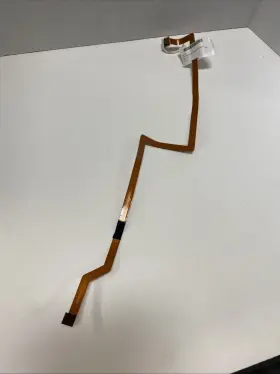
( Brand: Dell ), ( Part Type: Ribbon ), ( Manufacturer Part Number: 8GGV8 )
Review DELL Poweredge Left Ear Ribbon
The Dell PowerEdge R940 Left Ear Ribbon is an essential component for the Dell PowerEdge R940 server, ensuring proper and efficient fan operation. This ribbon cable is specifically designed for the left ear of the server's fan tray and plays a crucial role in transmitting power and data signals between the motherboard and the fans.
Measuring approximately 39.37 inches (99.5 cm) in length, this ribbon cable features 14 pins arranged in a 7x2 configuration. Each pin is gold-plated to ensure a secure and reliable connection, reducing the risk of corrosion and enhancing the durability of the cable. The ribbon is also flexible, allowing it to bend and adapt to the contours of the fan tray without causing damage.
The Dell PowerEdge R940 Left Ear Ribbon is made of high-quality materials that meet or exceed industry standards. It is engineered to withstand the demanding environment of a data center, where temperature fluctuations and high airflow can put stress on components. The ribbon cable is also resistant to electromagnetic interference (EMI) and radio frequency interference (RFI), ensuring stable and uninterrupted data transmission.
Installing the Dell PowerEdge R940 Left Ear Ribbon is a straightforward process. Simply align the pins on the ribbon cable with their corresponding connectors on the motherboard and fan tray, and gently press the cable into place. The ribbon should click securely into position, creating a solid connection.
In summary, the Dell PowerEdge R940 Left Ear Ribbon is an essential accessory for the Dell PowerEdge R940 server. Its high-quality design, reliable gold-plated pins, and flexibility make it an excellent choice for data center environments where efficient fan operation and stable data transmission are paramount.
A Detailed Analysis of Buying Dell PowerEdge R940's Left Ear Ribbon
The Dell PowerEdge R940 is a high-performance server, and like any other complex technology, it requires regular maintenance and replacement of components. One such component is the left ear ribbon, which plays a crucial role in the server's data transfer. In this analysis, we will discuss the pros and cons of buying a Dell 8GGV8 PowerEdge R940 left ear ribbon to help you make an informed decision.
Pros:1. OEM Compatibility: The Dell 8GGV8 PowerEdge R940 left ear ribbon is an Original Equipment Manufacturer (OEM) part, ensuring optimal performance and reliability. It is designed to work seamlessly with the PowerEdge R940 server.
2. High Data Transfer Rates: The left ear ribbon supports high-speed data transfer rates, enabling the server to process large amounts of data efficiently.
3. Minimizes Downtime: A faulty left ear ribbon can lead to server downtime, resulting in lost productivity and revenue. Replacing it with a genuine OEM part can help minimize these disruptions.
Cons:1. Cost: OEM parts, including the Dell 8GGV8 PowerEdge R940 left ear ribbon, tend to be more expensive compared to third-party alternatives.
2. Limited Availability: Dell OEM parts might not be readily available in local markets or from all resellers, which could lead to longer wait times for replacement.
3. No Compatibility with Other Servers: Since this ribbon is specifically designed for the PowerEdge R940, it cannot be used with other Dell or non-Dell server models.
Ending Conclusion:The decision to buy the Dell 8GGV8 PowerEdge R940 left ear ribbon ultimately depends on your organization's priorities and budget. If reliability, optimal performance, and minimizing downtime are your top concerns, then investing in an OEM part is a wise choice. However, if cost is a significant factor, you might want to consider third-party alternatives or explore refurbished or used parts.
Recommendation:If your organization relies heavily on the PowerEdge R940 server and requires consistent high performance, we recommend purchasing the Dell 8GGV8 PowerEdge R940 left ear ribbon as a replacement. The benefits of using an OEM part outweigh the potential cost savings from third-party alternatives, especially when considering the importance of minimizing server downtime and maintaining optimal performance.
Details:
Pulled from working unit. 30 day DOA warranty.
part #: 8ggv8 prices
- $29.00-$44.99
specifications serversappy:
- brand: Dell
- part type: Ribbon
- manufacturer part number: 8GGV8
general serversappy:
- Enterprise Networking, Servers > Server Components > Other Ent Server Components
- condition: Used
seller serversappy:
- # reviews: 891
- city: Minneapolis, Minnesota
- rating: 100.0%
offer serversappy:
- sold: 0
- started: August 5, 2025
- quantity: 1
- availability: In Stock
- options: Ship-to-home
shipping serversappy:
- carrier: USPS
- type: Calculated
- cost: $7.10
- service: USPS Ground Advantage
- class: Standard
- transit: 3-8 Days
payments serversappy:
- wallet: Paypal
- credit card: Discover
- other
returns serversappy:
- policy: No Returns
Dell 8GGV8 Is Similar To:
- Dell 0jnmfw Poweredge C4130 160x90mm Thermal Module Sxm2-gpu Cooling Heatsink Jnmfw B (38.1% similar) No others please. The photos and the actual item may have 5-10% difference. Select a topic. Exchange on certain items. Lock: ROOM202-G. Dell poweredge C4130 160X90MM thermal module SXM2-GPU cooling heat sink Jenifer a n technology solution...(July 21st, 2024)
- Dell 72hgp Poweredge R430 Mini Sas Sata Ssd Bp To Perc Cable Black 072hgp (40.4% similar) The listed prices do not apply. May have signs on wears...(July 21st, 2024)
- Dell 4pg76 Poweredge 2u Server Front Bezel P n 04pg76 Tested Grade B (42.2% similar) Any parts not photographed will not be included. Dell poweredge 2u server front bezel p/n: 4PG76 tested working please carefully review the photos and details of item before purchasing to avoid buying incorrect. Cosmetic issues are not covered...(July 21st, 2024)
- Dell 0800jh 800jh Slot 6 Pcie 3.0 X16 Riser 3 Card For Poweredge R730xd R730 (37.6% similar) That fact may be exhibited in possible wear and tear associated with normal everyday use. Shipping is free. This is a used item. It is ideal for those who are looking other enterprise server components. There are not too many problems that cannot be rectified, if we communicate...(July 21st, 2024)
- Dell 0y446j Y446j Lot Of 10 Poweredge Tray For R410 And R510 3.5 Inch Non Hot Plug (35.8% similar) No screws included. Lot of 10 Dell poweredge tray Y446J for R410 and R510 3.5 non hot plug...(July 21st, 2024)
- Dell Cn-okp013 Poweredge Power And Usb Circuit Board Spare Parts Tested Working (33.3% similar) With the brand name Dell, you can be assured of quality and durability this board. Pulled from a working environment. Get your hands on this essential board today and keep server running smoothly. It is a great choice for those in need of replacement or spare parts their server...(July 21st, 2024)
- Dell Ddt01 Poweredge T60 Front Cover With Key (48.8% similar) Dell poweredge T60 front cover DDT01 w/ key, condition information whats included, includes: key.these items have been tested, and are guaranteed to be in good working condition. And computer equipment of all kinds. If a specific delivery type is required .e. Outer case may show some minor...(July 22nd, 2024)
- Dell Ffw09 2x Fh Pcie X16 Riser 1 Card 2u R1c For Poweredge R7525 (32.1% similar) 2x full height pic express X16 riser 1c assembly for Dell poweredge R7525 servers...(July 22nd, 2024)
- Dell 05nv48 5nv48 Pcie X16 Riser 2c Card For Poweredge R450 (42% similar) Pic express X16 riser 2c card for Dell poweredge R450 servers...(July 22nd, 2024)
- Dell 0k617r Poweredge T110 Front I o Control Panel Board P n Tested Working (36.2% similar) We must receive return/exchange items. Cosmetic issues are not covered under the guarantee. Dell poweredge T110 front i/o control panel board p/n: 0K617R tested working, please carefully review the photos and details of item before purchasing to avoid buying incorrect...(July 22nd, 2024)
- Dell 0kw180 Kw180 Poweredge Fc630 104mm Cpu1 High Performance Heatsink 135w Screw Down 5jngy (37.6% similar) Dell poweredge FC630 104MM CPU1 high performance heat sink 135W screw down 5 Jung. No others please. Exchange on certain items. Select a topic. A n technology solution. The photos and the actual item may have 5-10% difference...(July 22nd, 2024)

5 offers $29.00–$44.99 USD
- Used. Offer #1 priced at $29.00 + $8.30 delivery = $37.30* total. 30 day DOA warranty. Pulled from working unit.+$8.30 shipping
- Used. Offer #2 priced at $44.99 + $0.00 delivery = $44.99* total. DP/N: DN67H.FREE SHIPPING
- New. Offer #3 priced at $36.70 + $0.00 delivery = $36.70* total. Fits Model: WH-1000XM4 & WH-1000XM3. New Sony WH-1000XM3 and WH-1000XM4 repair part.FREE SHIPPING
- Used. Offer #4 priced at $769.00 + $0.00 delivery = $769.00* total. 58D2W Dell PowerEdge R740XD Hard Drive Backplane Expansion Board 058D2W 1. DTTHJ Dell EMC PowerEdge R740XD Riser Board 0DTTHJ 1.FREE SHIPPING
- Used. Offer #5 priced at $639.99 + $0.00 delivery = $639.99* total. GHGTP Dell PowerEdge R740 R740xd R7425 Riser 1D Card 0GHGTP DTTHJ Dell EMC PowerEdge Server R740 R740XD Riser Board 0DTTHJ 1.FREE SHIPPING