DELL 0T521P Power Indicator Led Poweredge Powervault
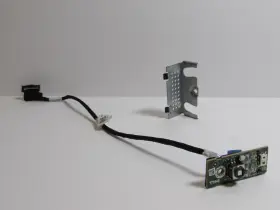
( Brand: Dell ), ( Type: Cable ), ( Unit Type: Unit ), ( Manufacturer Part Number: 0T521P ), ( Country Of Origin: China )
Review DELL Power Button Indicator Led Assembly Poweredge And Powervault
The Dell 0T521P Power Indicator LED for PowerEdge PowerVault is an essential component for monitoring the power status of your PowerVault system. This LED module is designed exclusively for Dell PowerVault systems to provide clear visual cues for power conditions, ensuring seamless operation and enhanced data center management.
Measuring 1.6 inches by 1.7 inches by 0.5 inches (4.1 cm x 4.3 cm x 1.3 cm), this compact yet robust LED module is engineered to withstand the demands of a data center environment. It features a modern, sleek design with a black finish that blends seamlessly with the PowerEdge PowerVault enclosure.
The Dell 0T521P Power Indicator LED boasts five bright, individually addressable LEDs. Each LED corresponds to a specific power condition, enabling quick identification of the power status for each power supply. The LEDs are labeled with the corresponding power supply number, making it easy to locate and assess the power status at a glance.
This LED module also includes a test button, allowing users to manually cycle the power conditions to verify proper functionality. The test button is located on the top side of the module for easy access.
Installation of the Dell 0T521P Power Indicator LED is straightforward. It is designed to be easily installed in the PowerEdge PowerVault system using the provided mounting hardware. The module is engineered to be compatible with various PowerVault models, ensuring broad applicability for Dell PowerVault users.
In summary, the Dell 0T521P Power Indicator LED for PowerEdge PowerVault is an indispensable tool for effectively managing power conditions within your data center. Its compact, modern design, bright LEDs, and intuitive test button make it an essential addition to your PowerVault system, ensuring optimal performance and peace of mind.
Buying a Dell 0T521P Power Indicator LED for a PowerEdge PowerVault can be a useful investment for monitoring the power status of your storage system. Here are some potential pros and cons to consider before making a purchase:
Pros:1. Improved visibility: The power indicator LED can help you quickly identify the power status of individual PowerVault enclosures or disk drives, allowing you to easily troubleshoot power-related issues.
2. Remote monitoring: If you manage multiple PowerVault systems, the power indicator LED can help you monitor their power status remotely, saving you time and effort.
3. Customizability: The 0T521P LED comes with multiple color options to choose from, allowing you to customize the look of your PowerVault system.
Cons:1. Additional cost: The power indicator LED is an optional accessory, and it comes with an additional cost. If you are on a tight budget, you may want to consider whether the benefits of the LED outweigh the cost.
2. Compatibility: The 0T521P LED is designed specifically for Dell PowerEdge PowerVault systems, so it may not be compatible with other brands or models of storage systems.
3. Limited functionality: The power indicator LED only displays the power status of the connected enclosure or disk drive, and it does not provide any other detailed information.
In conclusion, the Dell 0T521P Power Indicator LED for PowerEdge PowerVault can be a useful accessory for monitoring the power status of your storage system. Its benefits include improved visibility, remote monitoring, and customizability. However, the additional cost, compatibility limitations, and limited functionality may be drawbacks for some users. Ultimately, the decision to purchase the LED depends on your specific needs and budget. If you manage multiple PowerVault systems and value the benefits of improved visibility and remote monitoring, the LED may be a worthwhile investment. Otherwise, you may want to consider other options for monitoring the power status of your storage system.
Details:
Dell 0T521P Front Panel Power Button LED assembly Pulled tested and working from DR40 compatible with PowerVault PowerEdge model's. Cross reference part numbers for certainty this is compatible with your unit.
part #: 0t521p price
- $10.00
specifications serversappy:
- brand: Dell
- type: Cable
- unit type: Unit
- manufacturer part number: 0T521P
- country of origin: China
shipping serversappy:
- type: Fixed
- service: USPS First Class
- class: Standard
- carrier: USPS
- cost: $0.00
- transit: 5-11 Days
offer serversappy:
- started: January 27, 2026
- sold: 0
- options: Ship-to-home
- availability: In Stock
- quantity: 1
returns serversappy:
- policy: No Returns
seller serversappy:
- city: Hollidaysburg, Pennsylvania
- # reviews: 559
- rating: 100.0%
general serversappy:
- Enterprise Networking, Servers > Server Components > Other Ent Server Components
- condition: Used
payments serversappy:
- other
- wallet: Google-pay
- credit card: Discover
Dell 0T521P Is Similar To:
- Dell 0jnmfw Poweredge C4130 160x90mm Thermal Module Sxm2-gpu Cooling Heatsink Jnmfw B (31.9% similar) No others please. The photos and the actual item may have 5-10% difference. Select a topic. Exchange on certain items. Lock: ROOM202-G. Dell poweredge C4130 160X90MM thermal module SXM2-GPU cooling heat sink Jenifer a n technology solution...(July 21st, 2024)
- Dell 72hgp Poweredge R430 Mini Sas Sata Ssd Bp To Perc Cable Black 072hgp (34.4% similar) The listed prices do not apply. May have signs on wears...(July 21st, 2024)
- Dell 4pg76 Poweredge 2u Server Front Bezel P n 04pg76 Tested Grade B (30.1% similar) Any parts not photographed will not be included. Dell poweredge 2u server front bezel p/n: 4PG76 tested working please carefully review the photos and details of item before purchasing to avoid buying incorrect. Cosmetic issues are not covered...(July 21st, 2024)
- Dell 0800jh 800jh Slot 6 Pcie 3.0 X16 Riser 3 Card For Poweredge R730xd R730 (42.9% similar) That fact may be exhibited in possible wear and tear associated with normal everyday use. Shipping is free. This is a used item. It is ideal for those who are looking other enterprise server components. There are not too many problems that cannot be rectified, if we communicate...(July 21st, 2024)
- Dell 0y446j Y446j Lot Of 10 Poweredge Tray For R410 And R510 3.5 Inch Non Hot Plug (33.8% similar) No screws included. Lot of 10 Dell poweredge tray Y446J for R410 and R510 3.5 non hot plug...(July 21st, 2024)
- Dell Cn-okp013 Poweredge Power And Usb Circuit Board Spare Parts Tested Working (31.8% similar) With the brand name Dell, you can be assured of quality and durability this board. Pulled from a working environment. Get your hands on this essential board today and keep server running smoothly. It is a great choice for those in need of replacement or spare parts their server...(July 21st, 2024)
- Dell Ddt01 Poweredge T60 Front Cover With Key (37.4% similar) Dell poweredge T60 front cover DDT01 w/ key, condition information whats included, includes: key.these items have been tested, and are guaranteed to be in good working condition. And computer equipment of all kinds. If a specific delivery type is required .e. Outer case may show some minor...(July 22nd, 2024)
- Dell Ffw09 2x Fh Pcie X16 Riser 1 Card 2u R1c For Poweredge R7525 (44.8% similar) 2x full height pic express X16 riser 1c assembly for Dell poweredge R7525 servers...(July 22nd, 2024)
- Dell Cmd3m Tpm Trusted Platform Module 1.2 14g For R640 R740 T440 T640 (24.3% similar) Working in perfect conditions. Check to see if this part is compatible with your system before purchasing. Dell Tom trusted platform module 1.2 14G for R640 R740 T440 T640 CMD3M. 14-DAY DOA warranty. Blind shipping on request...(July 22nd, 2024)
- Dell 05nv48 5nv48 Pcie X16 Riser 2c Card For Poweredge R450 (43.8% similar) Pic express X16 riser 2c card for Dell poweredge R450 servers...(July 22nd, 2024)
- Dell 0k617r Poweredge T110 Front I o Control Panel Board P n Tested Working (32.7% similar) We must receive return/exchange items. Cosmetic issues are not covered under the guarantee. Dell poweredge T110 front i/o control panel board p/n: 0K617R tested working, please carefully review the photos and details of item before purchasing to avoid buying incorrect...(July 22nd, 2024)

2 offers $10.00–$10.00 USD
- Used. Offer #1 priced at $10.00 + $0.00 delivery = $10.00* total. Dell Front Panel Power Button & LED assembly.FREE SHIPPING
- Used. Offer #2 priced at $10.00 + $6.07 delivery = $16.07* total. Dell Power Edge R510 LEFT side rack mount ear and cable marked. (1pc) .+$6.07 shipping