DELL 0RFGR Server Management Controller Module Cmc Poweredge FX2/FX2S
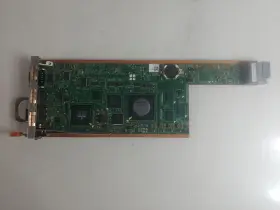
( Brand: Dell ), ( Manufacturer Part Number: 0RFGR ), ( Type: Management Controller Module Cmc ), ( Unit Type: Unit ), ( Machine Type: Server ), ( Compatible Model: Poweredge Fx2/fx2s )
Review DELL Server Management Controller Module Cmc Poweredge Fx2/fx2s
The Dell 0RFGR Server Management Controller (CMC) is a crucial component designed for Dell PowerEdge FX2 and FX2s servers. This controller module serves as the central nervous system of your server infrastructure, providing robust and intuitive management capabilities.
The Dell CMC offers a user-friendly web interface, allowing you to monitor, manage, and configure your PowerEdge FX2 and FX2s servers from a single console. This streamlined approach saves you time and resources, as you no longer need to access each server individually.
Key features of the Dell CMC include real-time system monitoring, enabling you to track essential metrics such as temperature, fan speed, and power consumption. It also supports remote management, allowing you to perform tasks like firmware updates, system reboots, and hardware diagnostics remotely.
Furthermore, the Dell CMC provides comprehensive event logging, enabling you to trace and rectify system issues quickly and efficiently. It also supports role-based access control, ensuring secure and controlled access to your server infrastructure.
In summary, the Dell 0RFGR Server Management Controller (CMC) is an indispensable tool for managing and maintaining your PowerEdge FX2 and FX2s servers. Its user-friendly interface, real-time monitoring, remote management capabilities, and robust event logging make it an invaluable addition to any server infrastructure.
Pros of buying Dell ORFGR Server Management Controller (CMC) for PowerEdge FX2/FX2s:1. Centralized Management: The CMC allows you to manage multiple servers from a single interface, saving time and resources.
2. Remote Management: You can manage your servers remotely, making it easier to monitor and maintain them from anywhere.
3. Compatibility: The CMC is specifically designed for Dell PowerEdge FX2/FX2s servers, ensuring seamless integration and compatibility.
4. Enhanced Security: The CMC offers advanced security features, including secure boot and encryption, to protect your data.
Cons of buying Dell ORFGR Server Management Controller (CMC) for PowerEdge FX2/FX2s:1. Cost: The CMC can be expensive, especially for small businesses or individuals with a limited budget.
2. Complexity: The CMC can be complex to set up and use, requiring technical expertise.
3. Dependence on Dell: Since the CMC is specific to Dell servers, it may limit your options if you decide to switch to a different brand in the future.
Conclusion:The Dell ORFGR Server Management Controller (CMC) for PowerEdge FX2/FX2s offers numerous benefits, including centralized management, remote management, and enhanced security. However, the high cost and complexity may deter some users. If you have the budget and technical expertise, the CMC can be a valuable investment for managing and maintaining your Dell servers. If not, you may want to consider alternative management solutions that are more budget-friendly and user-friendly.
Recommendation:If you are a small business or individual with a limited budget, you may want to consider alternative management solutions that offer similar features at a lower cost. If you have a larger budget and technical expertise, the Dell ORFGR Server Management Controller (CMC) can be a valuable investment for managing and maintaining your Dell PowerEdge FX2/FX2s servers. Ultimately, the best solution for you will depend on your specific needs and budget.
Details:
Tested in original machine under load conditions and working before removal from. If a part is not shown in the photos, then it included sale of this item. If possible, include photos or video to assist in understanding the problem. ORDERS, Our system will combine order automatically if they fall within a set of guidelines.
Also visually inspected for defects. Only what is in the photo included sale. This compatibility should be obtained by comparing the model and part number of item from listing to one that customer is attempting replace. Good Condition.
Testing Procedure, Key Functions Test Expected Result, Allow a user to connect other devices computer Check that the card is recognized Card visible in device manager Pass, Verify connection active by connecting peripheral The functions as expected Pass.
part #: 0rfgr prices
- $37.63-$202.39
specifications serversappy:
- brand: Dell
- manufacturer part number: 0RFGR
- type: Management Controller Module Cmc
- unit type: Unit
- machine type: Server
- compatible model: Poweredge Fx2/fx2s
payments serversappy:
- wallet: Apple-pay
- credit card: Mastercard
- other
shipping serversappy:
- transit: 5-10 Days
- type: Calculated
- cost: $0.00
- carrier: USPS, UPS
- class: Standard, Expedited, One-day
- service: USPS Ground Advantage, UPS Ground, USPS Priority Mail, UPS Next Day Air Saver
seller serversappy:
- rating: 99.6%
- city: Indianapolis, Indiana
- # reviews: 81314
returns serversappy:
- policy: Returns Accepted
- time: 30 Days
- paid by: Seller
- method: Money back
general serversappy:
- Enterprise Networking, Servers > Server Components > Other Ent Server Components
- condition: Used
offer serversappy:
- quantity: 2
- availability: In Stock
- sold: 0
- options: Ship-to-home
- started: September 24, 2024
Dell 0RFGR Is Similar To:
- Dell 0jnmfw Poweredge C4130 160x90mm Thermal Module Sxm2-gpu Cooling Heatsink Jnmfw B (29.1% similar) No others please. The photos and the actual item may have 5-10% difference. Select a topic. Exchange on certain items. Lock: ROOM202-G. Dell poweredge C4130 160X90MM thermal module SXM2-GPU cooling heat sink Jenifer a n technology solution...(July 21st, 2024)
- Dell 72hgp Poweredge R430 Mini Sas Sata Ssd Bp To Perc Cable Black 072hgp (24.7% similar) The listed prices do not apply. May have signs on wears...(July 21st, 2024)
- Dell 4pg76 Poweredge 2u Server Front Bezel P n 04pg76 Tested Grade B (28.4% similar) Any parts not photographed will not be included. Dell poweredge 2u server front bezel p/n: 4PG76 tested working please carefully review the photos and details of item before purchasing to avoid buying incorrect. Cosmetic issues are not covered...(July 21st, 2024)
- Dell 0800jh 800jh Slot 6 Pcie 3.0 X16 Riser 3 Card For Poweredge R730xd R730 (43% similar) That fact may be exhibited in possible wear and tear associated with normal everyday use. Shipping is free. This is a used item. It is ideal for those who are looking other enterprise server components. There are not too many problems that cannot be rectified, if we communicate...(July 21st, 2024)
- Dell 0y446j Y446j Lot Of 10 Poweredge Tray For R410 And R510 3.5 Inch Non Hot Plug (29.7% similar) No screws included. Lot of 10 Dell poweredge tray Y446J for R410 and R510 3.5 non hot plug...(July 21st, 2024)
- Dell 0jpvhw 16gb Idrac Vflash C10 Sdhc Sd Card Module 13 Gen R630 R730 Jpvhw (30.9% similar) Few items are new and would be specifically labeled as such. On rare occasions, damages may occur while in transit. Is it too late. What is the condition of item I receive. Dutchmen is a proud member of the Microsoft registered refurbished program. I placed an order, but want to make a...(July 21st, 2024)
- Dell 0h1h8m 16gb Idrac Vflash C10 Sdhc Sd Card Module 13 Gen R630 R730 H1h8m (28.2% similar) Each product is tested and in good working condition when it shipped. I placed an order, but want to make a change. Shipping info: orders placed before 1PM est will predominantly ship on the same day as they were. On rare occasions, damages may occur while in transit. Dell poweredge...(July 21st, 2024)
- Dell 037d9d 16gb Idrac Vflash C10 Sdhc Sd Card Module 13 Gen R630 R730 37d9d (29.5% similar) Few items are new and would be specifically labeled as such. Do you ship outside of the USA...(July 21st, 2024)
- Dell 66xhv 066xhv Precision M.2 2tb Ssd Nvme Installed Sas Flex Bay Module (28.6% similar) May have data on it so please wipe all. Pulled from a working 7820 system...(July 21st, 2024)
- Dell Cn-okp013 Poweredge Power And Usb Circuit Board Spare Parts Tested Working (26.3% similar) With the brand name Dell, you can be assured of quality and durability this board. Pulled from a working environment. Get your hands on this essential board today and keep server running smoothly. It is a great choice for those in need of replacement or spare parts their server...(July 21st, 2024)
- Dell Ddt01 Poweredge T60 Front Cover With Key (30.5% similar) Dell poweredge T60 front cover DDT01 w/ key, condition information whats included, includes: key.these items have been tested, and are guaranteed to be in good working condition. And computer equipment of all kinds. If a specific delivery type is required .e. Outer case may show some minor...(July 22nd, 2024)

5 offers $37.63–$202.39 USD
- Used. Offer #1 priced at $49.99 + $0.00 delivery = $49.99* total. Verify that the connection is active by connecting the peripheral device to the card The peripheral device functions as expected Pass. Server Components.FREE SHIPPING
- New. Offer #2 priced at $202.39 + $0.00 delivery = $202.39* total. FREE SHIPPING
- New. Offer #3 priced at $37.63 + $0.00 delivery = $37.63* total. FREE SHIPPING
- Used. Offer #4 priced at $40.00 + $0.00 delivery = $40.00* total. Excellent - Minor surface blemishes that can be seen, but not felt. Any other parts/power adapters or accessories that are NOT shown in the pictures are NOT included! Good - Small Scratches, minor scuffing.FREE SHIPPING
- Used. Offer #5 priced at $24.99 + $0.00 delivery = $24.99* total. Dell Server Management Controller Module CMC For PowerEdge FX2/ Used USPS Ground Advantage.FREE SHIPPING