DELL 0NMFDW Power Edge Cooling Fan R360 DC12V
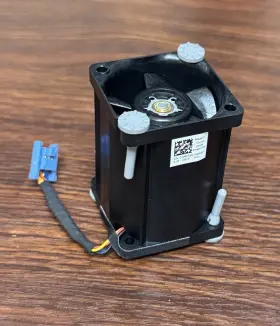
( Brand: Dell ), ( Type: Fan ), ( Manufacturer Part Number: 0NMFDW )
Review DELL Power Edge Cooling Fan Dc12v
The Dell DC12V PowerEdge R360 Cooling Fan is a high-performance, replaceable fan designed specifically for use in Dell PowerEdge R360 servers. This fan plays a crucial role in maintaining the optimal operating temperature of the server, ensuring stable and efficient performance.
The fan features a 3-phase, 4-pole design with 10 blades that maximizes airflow while minimizing noise. Each blade is engineered with aerodynamic precision to optimize the balance between airflow and acoustic performance. The fan operates using a DC12V power supply, making it an energy-efficient solution for cooling your Dell PowerEdge R360 server.
The fan housing is made from a durable, rust-resistant material, ensuring longevity and reliability even in demanding environments. An integrated thermal sensor monitors the temperature of the server and adjusts the fan speed accordingly, providing precise temperature control.
The Dell PowerEdge R360 Cooling Fan is easy to install, with a simple plug-and-play design that requires no additional tools or configuration. It is also compatible with various server configurations, making it a versatile solution for a wide range of applications.
In summary, the Dell DC12V PowerEdge R360 Cooling Fan is a high-performance, energy-efficient, and reliable cooling solution for your Dell PowerEdge R360 server. Its aerodynamically designed blades, integrated thermal sensor, and durable housing ensure optimal cooling performance, quiet operation, and long-lasting reliability.
The Dell PowerEdge R360 server supports hot-plugging of various components, including fans, to ensure maximum uptime and ease of maintenance. One common replacement fan model for this server is the Dell Part Number DC12V 0NMF DW, a 12V DC cooling fan. Here are some potential pros and cons of buying this fan:
Pros:1. OEM Compatibility: This fan is an original equipment manufacturer (OEM) replacement, meaning it is manufactured by Dell or under their authorization. It is designed to be an exact fit for the PowerEdge R360 server, ensuring optimal performance and compatibility.
2. Easy Installation: Hot-plug fans can be replaced without powering down the server, reducing downtime. The replacement fan should be a straightforward process, as it is the same size and design as the original.
3. Improved Cooling: A failed fan can lead to overheating, which can impact server performance and potentially cause data loss. Replacing the faulty fan with a new one can help maintain optimal server temperatures and ensure reliable operation.
4. Cost-Effective: Buying an OEM replacement fan may initially be more expensive than third-party alternatives. However, using genuine Dell parts can help avoid potential compatibility issues, longer downtime due to returns or defective parts, and potential damage to the server caused by non-OEM components.
Cons:1. Cost: Replacing a server fan with an OEM part can be more expensive compared to third-party alternatives. However, as mentioned earlier, the cost may be offset by the benefits of using genuine Dell parts, such as compatibility and reliability.
2. Limited Availability: Depending on the specific model and availability, it may take some time to receive the replacement fan. Dell's official website and authorized resellers should carry the part, but stock levels and shipping times can vary.
In conclusion, buying the Dell 0NMF DW DC12V fan for your PowerEdge R360 server can provide several benefits, including OEM compatibility, easy installation, improved cooling, and cost-effectiveness in the long run. However, the initial cost may be higher compared to third-party alternatives. It's essential to weigh these pros and cons carefully when deciding whether to purchase this fan or explore other options.
Recommendation:If you prioritize server reliability, ease of installation, and the peace of mind that comes with using OEM parts, purchasing the Dell 0NMF DW DC12V fan for your PowerEdge R360 server is a recommended option. However, if cost is a significant concern, consider exploring third-party alternatives while keeping in mind the potential risks and trade-offs.
Details:
Like new, pulled from a new server.
part #: 0nmfdw prices
- $24.99-$34.99
specifications serversappy:
- brand: Dell
- type: Fan
- manufacturer part number: 0NMFDW
returns serversappy:
- method: Money back
- policy: Returns Accepted
- time: 14 Days
- paid by: Buyer
offer serversappy:
- sold: 0
- quantity: 1
- started: July 14, 2025
- options: Ship-to-home
- best offers: True
- availability: In Stock
payments serversappy:
- wallet: Google-pay
- credit card: Diners-club
- other
seller serversappy:
- city: Rockville, Maryland
- rating: 100.0%
- # reviews: 1728
shipping serversappy:
- service: USPS Ground Advantage
- cost: $0.00
- class: Standard
- type: Fixed
- transit: 4-10 Days
- carrier: USPS
general serversappy:
- condition: Open box
- Enterprise Networking, Servers > Server Components > Other Ent Server Components
Dell 0NMFDW Is Similar To:
- Dell 0jnmfw Poweredge C4130 160x90mm Thermal Module Sxm2-gpu Cooling Heatsink Jnmfw B (53.8% similar) No others please. The photos and the actual item may have 5-10% difference. Select a topic. Exchange on certain items. Lock: ROOM202-G. Dell power edge C4130 160X90MM thermal module SXM2-GPU cooling heat sink Jenifer a n technology solution...(July 21st, 2024)
- Dell Cn-okp013 Poweredge Power And Usb Circuit Board Spare Parts Tested Working (37.1% similar) With the brand name Dell, you can be assured of quality and durability this board. Pulled from a working environment. Get your hands on this essential board today and keep server running smoothly. It is a great choice for those in need of replacement or spare parts their server...(July 21st, 2024)
- Dell 0101a3500-000-g Poweredge T630 Power Distribution Board Cables Include J14r7 0j14r7 (28.1% similar) Item was tested and passed diagnostics at the time of decommission. Item is used and shows signs of wear but fully functional...(July 23rd, 2024)
- Dell H00dd Poweredge R7920 Backplane Power Cable (36.6% similar) Quantity available: part number: H00DD. Global shipping available to most locations. Dell H00DD power edge R7920 back plane power cable: manufacturer: Dell. Rhino stocks just about all things hp, nimble, IBM, Dell, sun, Cisco, super micro and juniper, both new refurbished. On the image...(July 25th, 2024)
- Dell 0j0fkv Gpu Power Cable 15 Inch 8pin To Dual 6pin J0fkv (44.2% similar) Condition refurbished. Dell GPU power cable 15 8PIN to dual 6PIN 0J0FKV J0FKV. Specifications. Compere DTP#: MRK001...(July 26th, 2024)
- Dell 0mf857 Gpu Power Cable Pcie Extension 23 Inch 6pin To (42.7% similar) Compere DTP#: MRK001. Dell GPU power cable pie extension 23 6PIN to 0MF857. Condition refurbished. Specifications...(July 27th, 2024)
- Dell 4kg14 Genuine Poweredge R740xd2 Power Distribution Board (32.1% similar) Dell power edge R740XD2 power distribution board...(July 29th, 2024)
- Dell Yj9y6 C6100 1st And 2nd Power Distribution Board Tj77y With Bridge Card Cc8j4 (34.6% similar) Dell C6100 1ST 2ND power distribution board YJ9Y6 TJ77Y w/ bridge card CC8J4...(July 31st, 2024)
- Dell 07rjdv Poweredge Xr11 xr12 Power Distribution Board P n Tested Working (33.3% similar) We must receive return/exchange items. Cosmetic issues are not covered under the guarantee. Any parts not photographed will not be included. We care about each buyer and strive to solve any problem in the best business manner. Dell power edge XR11/XR12...(August 1st, 2024)
- Dell 0kv109 Desktop Rear Backplane Signal Cable Power Edge T320 (38.9% similar) Thanks: -, this item is used and in great working condition. Please review all photos carefully for wear on used / pre-owned broken items before purchasing. Make model: Dell power edge T320. We normally take many photos to help guide you in your decision. The cosmetic...(August 1st, 2024)
- Dell Cvht6 Lot Of 2 Precision T5600 Server Power Distribution Board Cables (26.9% similar) If a part is not shown in the photos, then it included sale of this item. Good condition. Orders, our system will combine order automatically if they fall within a set of guidelines. Also visually inspected for defects. If possible, include photos or video to assist in understanding the...(August 4th, 2024)

2 offers $24.99–$34.99 USD
- New. Offer #1 priced at $34.99 + $0.00 delivery = $34.99* total. SUNON XG40561BX-1Q664-S9T Pulled from a new server.FREE SHIPPING
- New. Offer #2 priced at $24.99 + $0.00 delivery = $24.99* total. This system fan assembly is engineered to maintain optimal thermal conditions for the Dell PowerEdge R350 and rack servers, ensuring hardware longevity and system stability under heavy workloads.FREE SHIPPING