DELL 0N7RWN Front Precision Workstation Control Panel Cords T7500
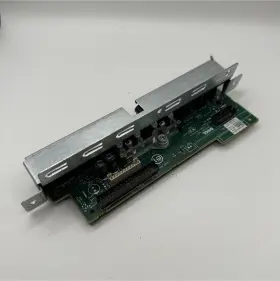
( Brand: Dell ), ( Type: Board ), ( Manufacturer Part Number: 0N7RWN )
Review DELL Precision Workstation Front Control Panel Cords Included
The Dell 0N7RWN Front Control Panel Cords are designed specifically for use with the Dell Precision T7500 Workstation. These cords connect the front panel I/O ports of the workstation to various devices such as a power button, hard drive activity LED, and fan control.
The power button cable features a standard 3-pin connector that links to the power button on the front panel. This allows the user to easily power on and off the workstation without having to open the case. The hard drive activity LED cable has a 2-pin connector that illuminates the LED light on the front panel, indicating that the hard drive is in use.
Moreover, the fan control cable has a 4-pin connector that connects to the fan control header on the motherboard. This cable enables users to manage the fan speeds manually, ensuring optimal cooling performance for the workstation. All the cords are made of high-quality materials to ensure durability and reliability.
These front control panel cords are easy to install and require no additional drivers or software. Simply plug the cords into the corresponding headers on the motherboard and the front panel I/O connectors, and your workstation will be fully operational.
The Dell 0N7RWN Front Control Panel Cords are essential for anyone who wants to customize the look and feel of their Dell Precision T7500 Workstation or for those who require manual fan control for specific applications. With their high-quality design and easy installation process, these cords are an excellent addition to any workstation setup.
Buying new Dell Precision T7500 Front Control Panel Cords (part number Dell 0N7RWN) can offer several advantages and potential drawbacks, depending on your specific needs and circumstances. Here are some pros and cons to help you make an informed decision:
Pros:1. Compatibility: New control panel cords ensure that all the front-panel connections are compatible with your Dell Precision T7500 workstation, which can help prevent potential issues with power or connectivity.
2. Reliability: New cords can offer improved reliability over using older, worn-out cords. This can help prevent unexpected power loss or other problems that can impact your work.
3. Warranty: New cords typically come with a warranty, which can provide peace of mind and help protect your investment.
4. Availability: New cords are readily available from Dell or authorized dealers, so you don't have to wait for a long time to get them.
Cons:1. Cost: New control panel cords can be more expensive than used or refurbished cords. You may want to consider the cost-benefit analysis before making a decision.
2. Environmental impact: Buying new cords contributes to electronic waste, as the old cords cannot be recycled or reused.
3. Convenience: If you prefer to save money or don't want to wait for new cords to arrive, you may consider looking for used or refurbished cords from third-party sellers.
Conclusion:In conclusion, buying new Dell Precision T7500 Front Control Panel Cords offers several advantages, such as compatibility, reliability, availability, and warranty. However, it comes with potential drawbacks, such as cost and environmental impact. Ultimately, the decision to buy new cords depends on your budget, time constraints, and the importance of having a reliable and compatible power and connectivity solution for your Dell Precision T7500 workstation.
Recommendation:If you prioritize reliability, compatibility, and warranty, and you have the budget for it, buying new Dell Precision T7500 Front Control Panel Cords is the best choice. However, if you're on a tight budget or prefer to recycle and reuse, you may consider looking for used or refurbished cords from trusted sources. In either case, make sure to check the compatibility of the cords with your specific Dell Precision T7500 workstation model before making a purchase.
Details:
Pulled from fully functional workstation T7500.
part #: 0n7rwn prices
- $11.99-$247.50
specifications serversappy:
- brand: Dell
- type: Board
- manufacturer part number: 0N7RWN
shipping serversappy:
- cost: $7.46
- carrier: USPS
- transit: 5-11 Days
- class: Standard
- type: Calculated
- service: USPS Ground Advantage
offer serversappy:
- sold: 0
- options: Ship-to-home
- best offers: True
- started: February 20, 2026
- quantity: 1
- availability: In Stock
general serversappy:
- Enterprise Networking, Servers > Server Components > Other Ent Server Components
- condition: Used
payments serversappy:
- other
- credit card: Discover
- wallet: Google-pay
seller serversappy:
- rating: 100.0%
- # reviews: 26
- city: College Place, Washington
returns serversappy:
- policy: No Returns
Dell 0N7RWN Is Similar To:
- Dell 4pg76 Poweredge 2u Server Front Bezel P n 04pg76 Tested Grade B (35.2% similar) Any parts not photographed will not be included. Dell power edge 2u server front bezel p/n: 4PG76 tested working please carefully review the photos and details of item before purchasing to avoid buying incorrect. Cosmetic issues are not covered...(July 21st, 2024)
- Dell 66xhv 066xhv Precision M.2 2tb Ssd Nvme Installed Sas Flex Bay Module (36.5% similar) May have data on it so please wipe all. Pulled from a working 7820 system...(July 21st, 2024)
- Dell Ddt01 Poweredge T60 Front Cover With Key (43.7% similar) Dell power edge T60 front cover DDT01 w/ key, condition information whats included, includes: key.these items have been tested, and are guaranteed to be in good working condition. And computer equipment of all kinds. If a specific delivery type is required .e. Outer case may show some minor...(July 22nd, 2024)
- Dell 0k617r Poweredge T110 Front I o Control Panel Board P n Tested Working (57.7% similar) We must receive return/exchange items. Cosmetic issues are not covered under the guarantee. Dell power edge T110 front i/o control panel board p/n: 0K617R tested working, please carefully review the photos and details of item before purchasing to avoid buying incorrect...(July 22nd, 2024)
- Dell R3m4v 1u Front Bezel With Lcd For Poweredge 14th Gen No Keys Asis Lot 4 (27.8% similar) Dell R3M4V 1u front bezel w/ LCD for power edge 14TH gen. No keys ANSIs lot...(July 24th, 2024)
- Dell 0h12g7 Poweredge T620 Server Front Control Panel Board P n Tested (58.3% similar) We care about each buyer and strive to solve any problem in the best business manner. We must receive return/exchange items. Cosmetic issues are not covered under the guarantee. Any parts not photographed will not be included. Dell power edge T620 server...(July 27th, 2024)
- Dell 012y5p 08cw5k Front Bezel Cover With Key For Poweredge R540 R740 (33.6% similar) The high-quality cover is designed to keep your server secure and protected from dust scratches. The cover is made from durable materials and built to last, ensuring that your server stays protected for longer.the easy install fits snugly over server, providing a secure comfortable fit...(July 30th, 2024)
- Dell H12pw Poweredge R430 Front Control Panel (53.8% similar) Minor cosmetic blemishes have no impact on the systems overall functionality or performance. Scuffs/scratches/marks: minor scratching on USB ports. May not include focus materials that are working or tested. Fully cleaned with all non-original labels removed. Sunning ships with FedEx...(August 1st, 2024)
- Dell 0p1xy1 Precision T7820 T7920 Dpwc500 Thunderbolt 3 Add-in Card P n (38.6% similar) This part was pulled from a working computer that split into parts, it has been tested and is in excellent condition with no known issues. Exact item pictured, if you don't see it in the picture isn't included. Warranty: a 30 day DOA warranty is included...(August 2nd, 2024)
- Dell Wy907 Pe300 I o Control Panel (50.9% similar) Orders are normally processed promptly within 24-48 hours. Picture is for reference only. WY907 - Dell PE300 i/o control panel. Knowledgeable sales advisers. 30 day warranty. However, under certain circumstances, there may be some delay. Wide range of products. Need it fast...(August 2nd, 2024)
- Dell Cvht6 Lot Of 2 Precision T5600 Server Power Distribution Board Cables (41.9% similar) If a part is not shown in the photos, then it included sale of this item. Good condition. Orders, our system will combine order automatically if they fall within a set of guidelines. Also visually inspected for defects. If possible, include photos or video to assist in understanding the...(August 4th, 2024)

5 offers $11.99–$247.50 USD
- Used. Offer #1 priced at $15.00 + $8.06 delivery = $23.06* total. Pulled from fully functional workstation .+$8.06 shipping
- Used. Offer #2 priced at $247.50 + $Calculated delivery = $247.50* total. hours are m-f 11am-2:30pm.+$Calculated shipping
- New. Offer #3 priced at $11.99 + $0.00 delivery = $11.99* total. Japanese (& most Asia) cord available. 5ft Length.FREE SHIPPING
- Used. Offer #4 priced at $6.99 + $6.98 delivery = $13.97* total. Dell P148J Precision N USB/AUDIO CONTROL CN-0P148J Board FF219.+$6.98 shipping
- Used. Offer #5 priced at $14.95 + $10.00 delivery = $24.95* total. Condition is Manufacturer refurbished.+$10.00 shipping