DELL 0M2M5G Front Precision Workstation Panel Sd Reader 3640 I/o
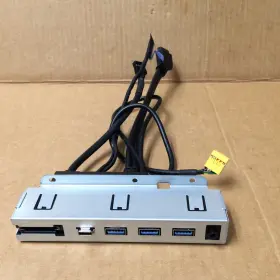
( Brand: Dell ), ( Type: Control Panel ), ( Manufacturer Part Number: 0M2M5G )
Review DELL Precision Workstation Front I/o Panel Sd Reader
The Dell 0M2M5G Front I/O Panel SD Reader is an essential addition to your Dell Precision 3640 workstation, providing extra flexibility and convenience in handling SD cards. This Front I/O Panel is meticulously designed to seamlessly integrate with your workstation, enhancing its functionality without occupying much valuable desk space.
This SD reader panel is engineered to deliver high-speed data transfer rates, ensuring that you can access, read, and write SD cards quickly and efficiently. The panel supports various SD formats, including SD, SDHC, and SDXC, catering to a wide range of storage needs. With this reader, you can easily transfer large media files, documents, or project data between your workstation and your SD cards.
The Dell 0M2M5G Front I/O Panel SD Reader is installed at the front of your Precision 3640 workstation, allowing you to access SD cards without having to open the side panel or interrupting your workflow. This design not only saves time but also minimizes the risk of dust or debris entering the workstation. The panel features a sleek and understated design, blending seamlessly with your workstation's aesthetic.
The SD reader is designed with durability in mind, ensuring that it can withstand the rigors of daily use in a professional environment. It is built to Dell's robust quality standards, ensuring reliability and stability. The panel is also easy to install, requiring no additional tools or expertise.
In conclusion, the Dell 0M2M5G Front I/O Panel SD Reader is an indispensable accessory for your Dell Precision 3640 workstation. It offers quick and easy SD card access, high-speed data transfer rates, and a durable and sleek design, making it an excellent investment for professionals who require efficient and convenient data handling.
The Dell 0M2M5G Precision 3640 Workstation Front I/O Panel SD Reader is an optional add-on for Dell Precision 3640 workstations, which adds an SD card reader to the front I/O panel. Here are some potential pros and cons of purchasing this component:
Pros:1. Convenience: Having an SD card reader built into the workstation itself can save time and effort, as users won't have to constantly remove the side panel to access SD cards.
2. Faster Data Transfer: An integrated SD card reader can offer faster data transfer rates compared to external readers, especially when dealing with large files or multiple cards.
3. Reduced Clutter: By integrating the SD card reader into the workstation, users can reduce the number of peripherals on their desk, keeping their workspace more organized.
Cons:1. Additional Cost: The SD card reader is an optional component, which means an extra cost for users who already purchased the workstation.
2. Limited Compatibility: The Dell 0M2M5G Precision 3640 Workstation Front I/O Panel SD Reader is specifically designed for use with Dell Precision 3640 workstations, so it may not be compatible with other systems.
Conclusion:The Dell 0M2M5G Precision 3640 Workstation Front I/O Panel SD Reader can offer several benefits for users who frequently work with SD cards, including increased convenience, faster data transfer rates, and a more organized workspace. However, it also comes with an additional cost and limited compatibility. Ultimately, the decision to purchase this component depends on the user's specific needs and budget.
Recommendation:If you frequently work with SD cards and value the benefits of an integrated SD card reader, the Dell 0M2M5G Precision 3640 Workstation Front I/O Panel SD Reader can be a worthwhile investment. However, if you rarely use SD cards or prefer to keep your costs low, it may be best to stick with an external reader or forego the feature altogether.
Details:
Dell Precision 3640 Workstation Front I/O Panel w/ SD Reader 0M2M5G.
part #: 0m2m5g prices
- $19.99-$29.69
specifications serversappy:
- brand: Dell
- type: Control Panel
- manufacturer part number: 0M2M5G
general serversappy:
- condition: Used
- Enterprise Networking, Servers > Server Components > Other Ent Server Components
payments serversappy:
- wallet: Apple-pay
- credit card: Discover
- other
seller serversappy:
- rating: 100.0%
- # reviews: 6777
- city: Littleton, Colorado
shipping serversappy:
- transit: 2-7 Days
- service: Standard
- class: Standard
- type: Fixed
- cost: $0.00
returns serversappy:
- paid by: Buyer
- policy: Returns Accepted
- method: Money back
- time: 30 Days
offer serversappy:
- quantity: 1
- availability: In Stock
- started: February 12, 2026
- options: Ship-to-home
- sold: 0
- best offers: True
Dell 0M2M5G Is Similar To:
- Dell 4pg76 Poweredge 2u Server Front Bezel P n 04pg76 Tested Grade B (42.3% similar) Any parts not photographed will not be included. Dell power edge 2u server front bezel p/n: 4PG76 tested working please carefully review the photos and details of item before purchasing to avoid buying incorrect. Cosmetic issues are not covered...(July 21st, 2024)
- Dell 66xhv 066xhv Precision M.2 2tb Ssd Nvme Installed Sas Flex Bay Module (36.4% similar) May have data on it so please wipe all. Pulled from a working 7820 system...(July 21st, 2024)
- Dell Ddt01 Poweredge T60 Front Cover With Key (50.9% similar) Dell power edge T60 front cover DDT01 w/ key, condition information whats included, includes: key.these items have been tested, and are guaranteed to be in good working condition. And computer equipment of all kinds. If a specific delivery type is required .e. Outer case may show some minor...(July 22nd, 2024)
- Dell 0k617r Poweredge T110 Front I o Control Panel Board P n Tested Working (47.2% similar) We must receive return/exchange items. Cosmetic issues are not covered under the guarantee. Dell power edge T110 front i/o control panel board p/n: 0K617R tested working, please carefully review the photos and details of item before purchasing to avoid buying incorrect...(July 22nd, 2024)
- Dell Kkp8d Server Vflash Media Reader For Poweredge R720 (25.6% similar) Orders, our system will combine order automatically if they fall within a set of guidelines. Good condition. Also visually inspected for defects. If possible, include photos or video to assist in understanding the problem. Tested in original machine under load conditions and working...(July 23rd, 2024)
- Dell R3m4v 1u Front Bezel With Lcd For Poweredge 14th Gen No Keys Asis Lot 4 (37% similar) Dell R3M4V 1u front bezel w/ LCD for power edge 14TH gen. No keys ANSIs lot...(July 24th, 2024)
- Dell 03t3t7 Emulex Lpe31000 Single Port Hba Fh With 16gbps Sfp Transciever (33.6% similar) Dell 03T3T7 Emile's LPE31000 single port BA FHA with 16 GPS SPF model: avg AFR-57F5MZ-LX 850NM...(July 26th, 2024)
- Dell 02yrk5 Inspiron 3647 Lga1150 Motherboard With Heatsink And I3-4130 Sr1np (42.5% similar) Compatible model: Dell inspiring 3647. Integrated graphic card: intel HD. Memory type: DDR3 dram. Tech specs: brand: Dell. If a product can not be replaced due to availability, similar agreed upon may substituted of equal value. Type: motherboard. Socket type: lag...(July 27th, 2024)
- Dell 0h12g7 Poweredge T620 Server Front Control Panel Board P n Tested (51.8% similar) We care about each buyer and strive to solve any problem in the best business manner. We must receive return/exchange items. Cosmetic issues are not covered under the guarantee. Any parts not photographed will not be included. Dell power edge T620 server...(July 27th, 2024)
- Dell 2pwxc Usb Right Rack Ear With Cable (38.5% similar) About: building block computers has been re marketing it gear since 1990 . Customer pays shipping charges. Part # 2 pix. Great condition. Buyer pays return shipping. Dell 2 pix USB right rack ear with cable cable...(July 29th, 2024)
- Dell 012y5p 08cw5k Front Bezel Cover With Key For Poweredge R540 R740 (42% similar) The high-quality cover is designed to keep your server secure and protected from dust scratches. The cover is made from durable materials and built to last, ensuring that your server stays protected for longer.the easy install fits snugly over server, providing a secure comfortable fit...(July 30th, 2024)

4 offers $19.99–$29.69 USD
- Used. Offer #1 priced at $29.69 + $0.00 delivery = $29.69* total. FREE SHIPPING
- Used. Offer #2 priced at $19.99 + $7.79 delivery = $27.78* total. May also fit other Dell PCs, but cannot verify so do your research first! SD Card Reader.+$7.79 shipping
- Used. Offer #3 priced at $20.99 + $9.99 delivery = $30.98* total. Part number -Used (scratches, scuffs, marks, and other blemishes). VWR95 0VWR95.+$9.99 shipping
- For parts or not working. Offer #4 priced at $23.96 + $0.00 delivery = $23.96* total. Resolution: HD 1366 x 768 Manufacturer Part Number: TCP4G.FREE SHIPPING